Best Netlify Alternatives (2026)
On this page
Netlify popularized the idea of Git-push-to-deploy for static and Jamstack sites. Connect a repo, push a commit, and your site is live with preview deployments, serverless functions, and a CDN — all from one dashboard. It's a polished experience, but it's not without trade-offs: the credit-based billing model can be confusing, free-tier build minutes are capped at 300/month, and bandwidth overages on paid plans have caught more than a few teams off guard.
Whether you're hitting those limits or just want to see what else is out there, here are five Netlify alternatives worth looking at.
1. Puter
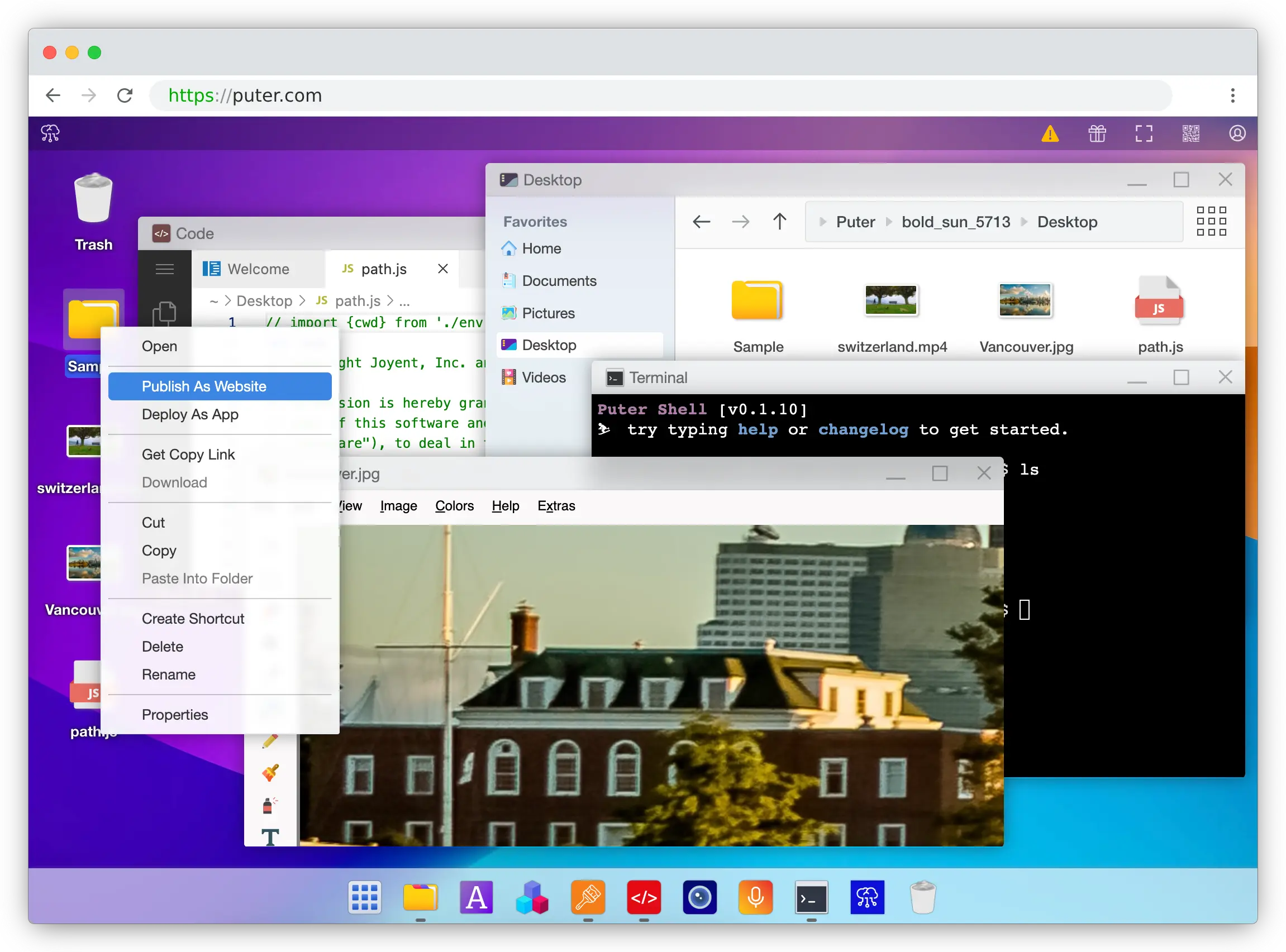
Puter is a cloud operating system that includes web hosting as one of its many capabilities. Unlike Netlify's Git-based workflow, Puter lets you drag-and-drop files into a browser-based desktop UI and right-click "Publish as Website" — three clicks to go live.
What Makes It Different
There's no build step to worry about. Where Netlify's model revolves around build minutes that can pause your site when exhausted, Puter lets you upload your build output directly and changes go live instantly.
Beyond hosting, Puter is a full cloud platform with a desktop UI in your browser, including a built-in code editor, file manager, and cloud storage. For server-side logic, it offers Serverless Workers with a simple router API — define routes in a worker.js file, deploy with one click, no config files needed. The Puter.js SDK also gives hosted sites access to AI APIs, key-value databases, object storage, and more. It's also open-source (AGPL-3.0) and self-hostable if that matters to you.
Key Differences from Netlify
Puter doesn't have a Git-based CI/CD pipeline — you deploy by uploading build output rather than connecting a repo. It also doesn't offer branch-based preview deployments or built-in form handling like Netlify does. If you need automated builds triggered by Git pushes, you'd need to handle that separately.
Comparison Table
| Feature | Puter | Netlify |
|---|---|---|
| Deployment method | Drag-and-drop / one-click | Git-based / CLI |
| Build pipeline | No build step needed |  300 min/month free 300 min/month free |
| Bandwidth | Available via credits |
100 GB/month free |
| Serverless functions | Workers |
125K invocations/month free |
| Preview deployments |  |
|
| Custom domains | |
|
| Free SSL | |
|
| Form handling | |
|
| AI / database / storage | Built-in |
|
| Open-source | AGPL-3.0 |
|
| Best for | Developers who want simple deploys and a full cloud platform | Teams wanting Git-based CI/CD with serverless features |
2. Cloudflare Pages
Cloudflare Pages is a hosting platform backed by Cloudflare's global edge network with 330+ data centers. Its headline feature is unlimited bandwidth on the free tier — no overage charges, ever.
What Makes It Different
Cloudflare Pages offers unlimited bandwidth and requests on its free plan, which is its biggest advantage over Netlify's 100 GB bandwidth cap. The free plan also includes 500 builds per month (measured by build count, not duration), unlimited sites, and unlimited team seats — Netlify restricts team members to 1 on free.
Pages Functions share the Workers free tier: 100,000 requests per day, resetting daily — compared to Netlify's 125K invocations per month. The tight integration with Cloudflare Workers, KV, D1 (SQL database), R2 (object storage), and Durable Objects makes it a powerful full-stack platform. The Workers Paid plan starts at $5/month, significantly cheaper than Netlify's $9+ paid tiers.
Key Differences from Netlify
Cloudflare Pages has a file limit of 20,000 files per site on the free plan and 25 MB max per file. It's limited to 1 concurrent build on free (same as Netlify). The setup is more developer-oriented and less beginner-friendly — there's no built-in form handling or analytics like Netlify offers. Git integration supports GitHub and GitLab but not Bitbucket.
Comparison Table
| Feature | Cloudflare Pages | Netlify |
|---|---|---|
| Free bandwidth | Unlimited | 100 GB/month |
| Builds | 500/month (by count) | 300 min/month (by duration) |
| Concurrent builds (free) | 1 | 1 |
| Team seats (free) | Unlimited | 1 |
| Serverless functions | 100K requests/day | 125K invocations/month |
| Preview deployments | |
|
| Git integration | GitHub, GitLab | GitHub, GitLab, Bitbucket |
| Edge network | 330+ data centers | Global CDN |
| Custom domains | |
|
| Free SSL | |
|
| Form handling | |
|
| Bandwidth overages | Never charged | $55 per 100 GB on paid plans |
| Paid plan starting price | $5/month | $9+/month |
| Best for | High-traffic sites that need zero bandwidth worries | Teams wanting a polished all-in-one deployment platform |
3. GitHub Pages

GitHub Pages is GitHub's built-in static site hosting. If your code is already on GitHub, publishing is one settings toggle away — no separate platform, no additional account, no billing setup.
What Makes It Different
GitHub Pages is completely free for public repositories. There are no tiers, no credits, no billing complexity — just flip a switch in your repo settings. It has native Jekyll integration with automatic builds, and other static site generators work via GitHub Actions workflows.
For open-source projects, documentation sites, and developer portfolios, it's the simplest possible hosting option. Your site lives right next to your code, and deployments happen automatically when you push.
Key Differences from Netlify
GitHub Pages is the most limited option on this list. It's purely static — no serverless functions, no edge functions, no form handling, no analytics. There are no preview deployments or branch deploys. The soft bandwidth limit is 100 GB/month (same as Netlify free), but the repository size is capped at 1 GB and builds are limited to roughly 10 per hour.
Commercial use is explicitly against the terms of service, and hosting Pages from private repositories requires a paid GitHub plan. Netlify has none of these restrictions.
Comparison Table
| Feature | GitHub Pages | Netlify |
|---|---|---|
| Pricing | Free (public repos) | Free tier with paid plans |
| Bandwidth | ~100 GB/month (soft limit) | 100 GB/month |
| Build limits | ~10 builds/hour | 300 min/month |
| Serverless functions | |
|
| Preview deployments | |
|
| Form handling | |
|
| Analytics | |
|
| Custom domains | |
|
| Free SSL | |
|
| Commercial use | Not allowed |
|
| Private repo hosting | Requires paid GitHub plan | Free |
| SSG support | Jekyll native, others via Actions | All major frameworks |
| Best for | Open-source projects and docs already on GitHub | Teams needing full deployment features |
4. Vercel
Vercel is a frontend deployment platform created by the team behind Next.js. It offers a polished developer experience with Git-based deployments, automatic preview URLs per PR, and first-class support for modern React features.
What Makes It Different
Vercel has the tightest integration with Next.js of any platform — features like Partial Prerendering, Server Actions, ISR, middleware, and streaming all work out of the box without configuration. The Hobby (free) plan includes 100 GB bandwidth, 1M function invocations, and 4 hours of Active CPU per month.
The developer experience is excellent: push to Git, get an automatic deploy with a preview URL for every pull request. Vercel also bundles v0, an AI-powered UI generator, into the ecosystem.
Key Differences from Netlify
Vercel's Hobby plan is strictly non-commercial — any commercial project requires the Pro plan at $20/user/month. Netlify's free tier has no such restriction. Function timeouts on Hobby are capped at 60 seconds (Pro extends to 300 seconds). The Pro plan costs $20/user/month with $20 in monthly usage credits and 1 TB bandwidth, while Netlify Pro is roughly comparable at $19–20/user/month. Enterprise pricing starts around $25K/year — a steep jump from Pro. There are documented cases of surprise bills from ISR revalidation, bandwidth spikes, and function invocations.
Comparison Table
| Feature | Vercel | Netlify |
|---|---|---|
| Free tier bandwidth | 100 GB | 100 GB |
| Free tier commercial use | Not allowed |
|
| Function invocations (free) | 1M/month | 125K/month |
| Function timeout (free) | 60 seconds | 10 seconds |
| Preview deployments | |
|
| Next.js support | First-class |
(lags on parity) |
| Edge functions | |
|
| Form handling | |
|
| Custom domains | |
|
| Free SSL | |
|
| Pro plan pricing | $20/user/month | $19–20/user/month |
| Bandwidth overages (Pro) | $0.15 per GB | $55 per 100 GB |
| Best for | Next.js projects that need framework-native deployment | Teams wanting broad framework support with built-in forms and analytics |
5. Firebase Hosting
Firebase Hosting is Google's web hosting service, part of the broader Firebase platform. It's not primarily a Netlify competitor — it's a Backend-as-a-Service with hosting attached.
What Makes It Different
The real value of Firebase is the ecosystem: Firestore (NoSQL database), Firebase Auth (50K MAU free), Realtime Database, Cloud Messaging, Analytics, and Crashlytics — all in one console. No other platform on this list offers this breadth of backend services. If you need auth, a database, push notifications, and hosting in one place, Firebase is hard to beat.
Firebase Hosting includes a global CDN on all plans and tight integration with Google Cloud Platform for scaling. Firebase App Hosting (a newer product) supports server-rendered Next.js and Angular apps, though it requires the Blaze (pay-as-you-go) plan.
Key Differences from Netlify
Firebase's free Spark plan includes just 10 GB storage and 360 MB/day data transfer — roughly 10 GB/month, far below Netlify's 100 GB. There's no Git-based CI/CD built in; you deploy via the Firebase CLI (firebase deploy). Cloud Functions require the Blaze plan with a billing account, while Netlify offers serverless functions on its free tier. There's no concept of branch deploys or preview URLs in the way Netlify does (though Hosting Channels offer something similar). Costs can spike unpredictably with Firestore reads, Cloud Functions, and storage.
Comparison Table
| Feature | Firebase Hosting | Netlify |
|---|---|---|
| Free bandwidth | ~10 GB/month (360 MB/day) | 100 GB/month |
| Free storage | 10 GB | Not storage-focused |
| Deployment method | Firebase CLI | Git-based / CLI |
| Serverless functions | Requires Blaze plan (2M invocations/month free) | 125K/month on free |
| Preview deployments | Limited (Hosting Channels) | |
| Auth service | 50K MAU free |
|
| Database | Firestore + Realtime DB |
|
| Analytics | Built-in |
|
| Custom domains | |
|
| Free SSL | |
|
| Form handling | |
|
| Bandwidth overage | $0.15 per GB (Blaze) | $55 per 100 GB on paid plans |
| Best for | Projects that need a full backend (auth, database, push notifications) alongside hosting | Teams focused on frontend deployment with serverless features |
Which Should You Choose?
Choose Puter if you want a simple deploy workflow without build pipelines or config files. Its built-in AI, database, and storage APIs mean you get a full cloud platform without configuring separate services.
Choose Cloudflare Pages if bandwidth is a concern. Unlimited bandwidth on the free tier means your site won't get throttled or billed if traffic spikes. Combined with Workers, KV, D1, and R2, it's the most powerful free hosting platform for developers who want edge computing capabilities.
Choose GitHub Pages if you're hosting an open-source project, documentation site, or portfolio that's already on GitHub. It's the simplest option but the most limited — static only, no serverless, no commercial use.
Choose Vercel if you're building with Next.js. No other platform matches its framework-native support for React Server Components, streaming, and incremental static regeneration. Just be aware of the non-commercial restriction on the free tier and per-seat pricing on Pro.
Choose Firebase Hosting if you need a full backend alongside your web hosting — auth, database, push notifications, and analytics in one console. The hosting itself is the weakest part of Firebase compared to dedicated hosting platforms, but the ecosystem is unmatched.
Stick with Netlify if you want a mature, all-in-one deployment platform with Git-based CI/CD, preview deployments, built-in forms, and broad framework support. It remains the most polished option for teams that want everything in one place without ecosystem lock-in.
Conclusion
The top Netlify alternatives are Puter, Cloudflare Pages, GitHub Pages, Vercel, and Firebase Hosting. Each takes a different approach to web hosting — from Puter's open-source cloud OS with drag-and-drop deploys to Cloudflare's unlimited-bandwidth edge network to Firebase's full backend suite. Whichever platform you choose, the best option is the one that fits your workflow, your budget, and how much infrastructure you want the platform to handle for you.
Related
- How to Host a Website for Free
- Deploy your Next.js Application with Puter
- Deploy your Astro Site with Puter
- Deploy your Flutter Web App with Puter
- Deploy your Angular App with Puter
- Deploy your Nuxt Application with Puter
- Deploy Your Vue.js App with Puter
- Deploy Your SvelteKit App With Puter
- Getting Started with Puter.js
- Top 5 AWS Lambda Alternatives (2026)
- Best Vercel Alternatives (2026)
- Top 5 Render Alternatives (2026)
- Top 5 Heroku Alternatives (2026)
- Top 5 Railway Alternatives (2026)
- Top 5 Fly.io Alternatives (2026)
- Best Neocities Alternatives (2026)
- Top 5 Cloudflare Workers Alternatives (2026)
- Best Cloudflare Pages Alternatives (2026)
- Best GitHub Pages Alternatives (2026)
Ship a Full-Stack App with One Prompt
Create a to-do list app using Puter.js
Coding manually? see the guide