Testing Ideogram 4.0's Text Rendering and Native 2K Output
We recently added Ideogram 4.0 to Puter.js. It's the successor to Ideogram 3.0, and Ideogram's specialty has always been text rendering, producing images where the typography actually says what you asked for.
For 4.0, Ideogram reports 0.97 OCR accuracy on the X-Omni benchmark. In their own designer-preference evaluation (4,366 votes across 9 models), it scored an ELO of 1062, second overall behind GPT Image 2, ahead of Qwen-Image and HunyuanImage 3.0.
Those numbers come from Ideogram, so we tested the text rendering ourselves against other image models available on Puter.js.
Testing the Text Rendering
We compared Ideogram 4.0 against FLUX.2 [dev], a comparable model that also claims strong text rendering. We used the same prompt for both, a menu board with six separate pieces of text, so we could count exactly which strings each model rendered correctly. Ideogram 4.0 generates at up to 2K natively, without an upscaling pass, but not by default, so we set an explicit width and height of 2048 in the code.
Here's the code we used. You can run it yourself in the Puter playground, or drop it into a page on your own site:
<html>
<body>
  <script src="https://js.puter.com/v2/"></script>
  <script>
    const prompt = "A chalkboard menu for a coffee shop called 'Driftwood Coffee'. The menu lists: 'Espresso $3.50', 'Flat White $4.75', 'Cold Brew $5.00', 'Matcha Latte $5.25'. At the bottom, small text reads 'Open daily 7am to 3pm'.";

    const models = [
      // Ideogram 4.0 doesn't output 2K by default; set width and height explicitly
      { label: "Ideogram 4.0", opts: { model: "ideogram/ideogram-4.0", width: 2048, height: 2048 } },
      { label: "FLUX.2 [dev]", opts: { model: "black-forest-labs/flux-2-dev" } },
    ];

    (async () => {
      const results = await Promise.all(
        models.map(async ({ label, opts }) => ({
<html>
<body>
<script src="https://js.puter.com/v2/"></script>
<script>
const prompt = "A chalkboard menu for a coffee shop called 'Driftwood Coffee'. The menu lists: 'Espresso $3.50', 'Flat White $4.75', 'Cold Brew $5.00', 'Matcha Latte $5.25'. At the bottom, small text reads 'Open daily 7am to 3pm'.";
const models = [
// Ideogram 4.0 doesn't output 2K by default; set width and height explicitly
{ label: "Ideogram 4.0", opts: { model: "ideogram/ideogram-4.0", width: 2048, height: 2048 } },
{ label: "FLUX.2 [dev]", opts: { model: "black-forest-labs/flux-2-dev" } },
];
(async () => {
const results = await Promise.all(
models.map(async ({ label, opts }) => ({<html>
<body>
<script src="https://js.puter.com/v2/"></script>
<script>
const prompt = "A chalkboard menu for a coffee shop called 'Driftwood Coffee'. The menu lists: 'Espresso $3.50', 'Flat White $4.75', 'Cold Brew $5.00', 'Matcha Latte $5.25'. At the bottom, small text reads 'Open daily 7am to 3pm'.";
const models = [
// Ideogram 4.0 doesn't output 2K by default; set width and height explicitly
{ label: "Ideogram 4.0", opts: { model: "ideogram/ideogram-4.0", width: 2048, height: 2048 } },
{ label: "FLUX.2 [dev]", opts: { model: "black-forest-labs/flux-2-dev" } },
];
(async () => {
const results = await Promise.all(
models.map(async ({ label, opts }) => ({
label,
image: await puter.ai.txt2img(prompt, opts), // returns an <img> element
}))
);
for (const { label, image } of results) {
const card = document.createElement("figure");
const caption = document.createElement("figcaption");
caption.textContent = label;
image.style.maxWidth = "320px";
card.append(caption, image);
document.body.appendChild(card);
}
})();
</script>
</body>
</html>
The prompt has six checkable strings in total: the shop name, four menu items with prices, and the hours line. A model gets a string right only if every word and digit is correct.
What We Found
Both models rendered all six strings correctly, including the small hours line at the bottom. On text accuracy alone, this test found no gap between them.
| Model | Strings rendered correctly (of 6) | Notes |
|---|---|---|
| Ideogram 4.0 | 6 | Added "TODAY'S MENU", text we didn't ask for |
| FLUX.2 [dev] | 6 | No extra text |
The differences showed up elsewhere. The first is style. Ideogram 4.0 produced something closer to graphic design than a photo. The shop name is a clean brush script that reads as a typeset font, the menu items are set in a uniform sans-serif with dotted leader lines, and the decorations (a coffee cup, a leaf sprig) look like clip art. FLUX.2 [dev] produced what looks like a photo of an actual chalkboard, with handwritten chalk letters, uneven strokes, and a wooden frame on a wall. Subjectively, we prefer the FLUX.2 output here. The prompt asked for a chalkboard menu, and FLUX.2 rendered chalk writing while Ideogram rendered a poster of a chalkboard.
The second is prompt adherence. Ideogram added a "TODAY'S MENU" subheading that isn't anywhere in the prompt. It fits the design, but if your use case needs the copy to be exactly what you specified, unrequested text is a problem, and it's the kind you have to proofread for.
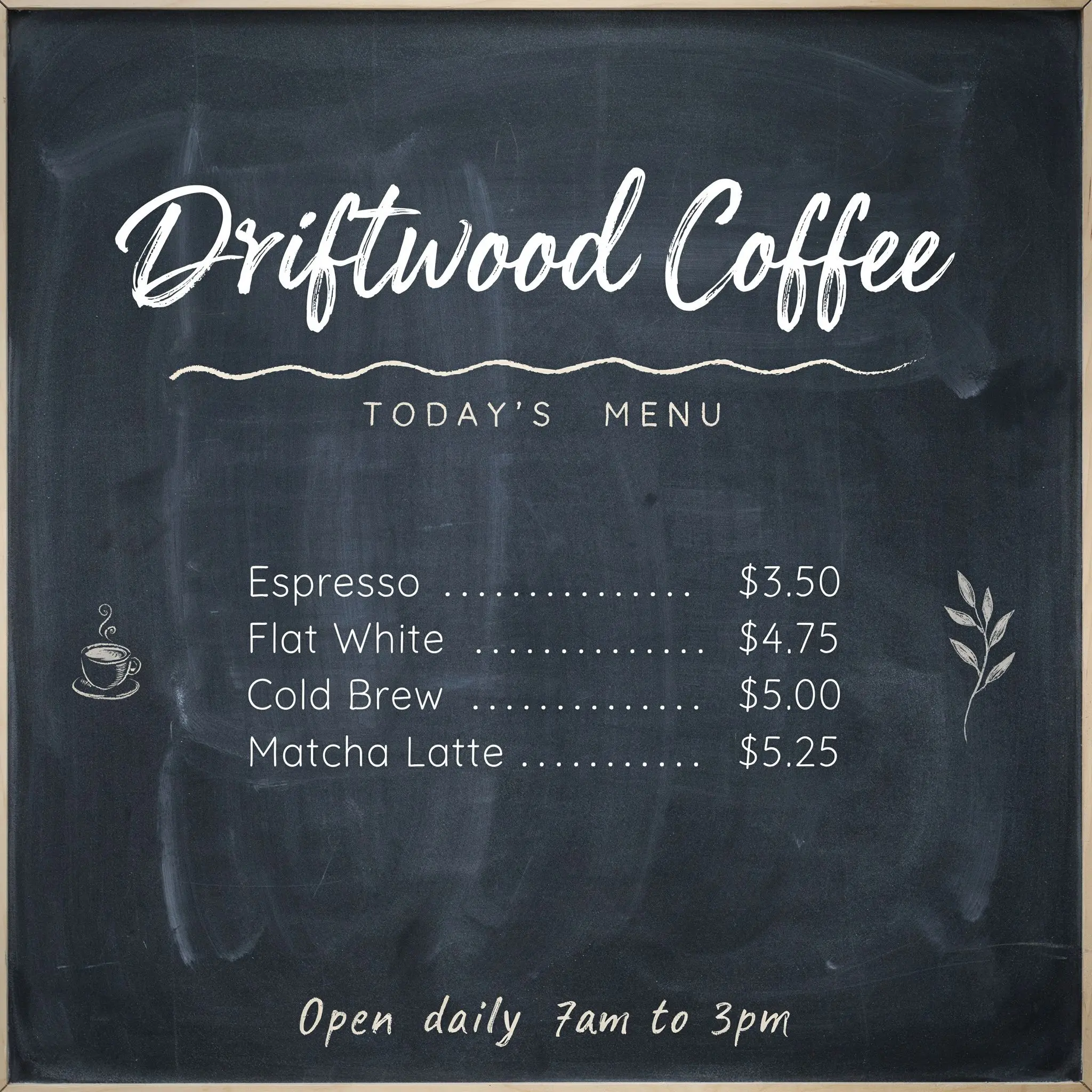
Ideogram 4.0
![FLUX.2 [dev] output: a photorealistic chalkboard menu with handwritten chalk lettering](/assets/img/flux-2-dev-result.webp)
FLUX.2 [dev]
One caveat on the comparison: per the code above, Ideogram ran at 2048x2048 while FLUX.2 ran at its default 1MP size. That gives Ideogram a resolution advantage on small text, and the small text came out clean in both anyway.
Try It Out
Ideogram 4.0 is available on Puter.js now. Puter.js lets you add AI to your app with no API keys and no server; each user covers their own usage, so it costs you nothing as the developer.
From a script tag:
<html>
<body>
    <script src="https://js.puter.com/v2/"></script>
    <script>
        puter.ai.txt2img(
            "A chalkboard menu for a coffee shop called 'Driftwood Coffee', listing 'Espresso $3.50' and 'Cold Brew $5.00'",
            { model: "ideogram/ideogram-4.0" }
        ).then((image) => {
            document.body.appendChild(image);
        });
    </script>
</body>
</html>
Or from npm with @heyputer/puter.js:
// npm install @heyputer/puter.js
import { puter } from "@heyputer/puter.js";

const image = await puter.ai.txt2img("...", { model: "ideogram/ideogram-4.0" });
Both expose the same puter.* API, and you can run the example in the Puter playground.
Related:
Ship a Full-Stack App with One Prompt
Create a to-do list app using Puter.js
Coding manually? see the guide