How to Use LiteLLM with Puter
On this page
In this tutorial, you'll learn how to use LiteLLM with Puter. LiteLLM provides a unified completion() interface for 100+ LLMs. Since Puter exposes an OpenAI-compatible endpoint, you can use LiteLLM's api_base parameter to route any model through Puter.
Prerequisites
- A Puter account
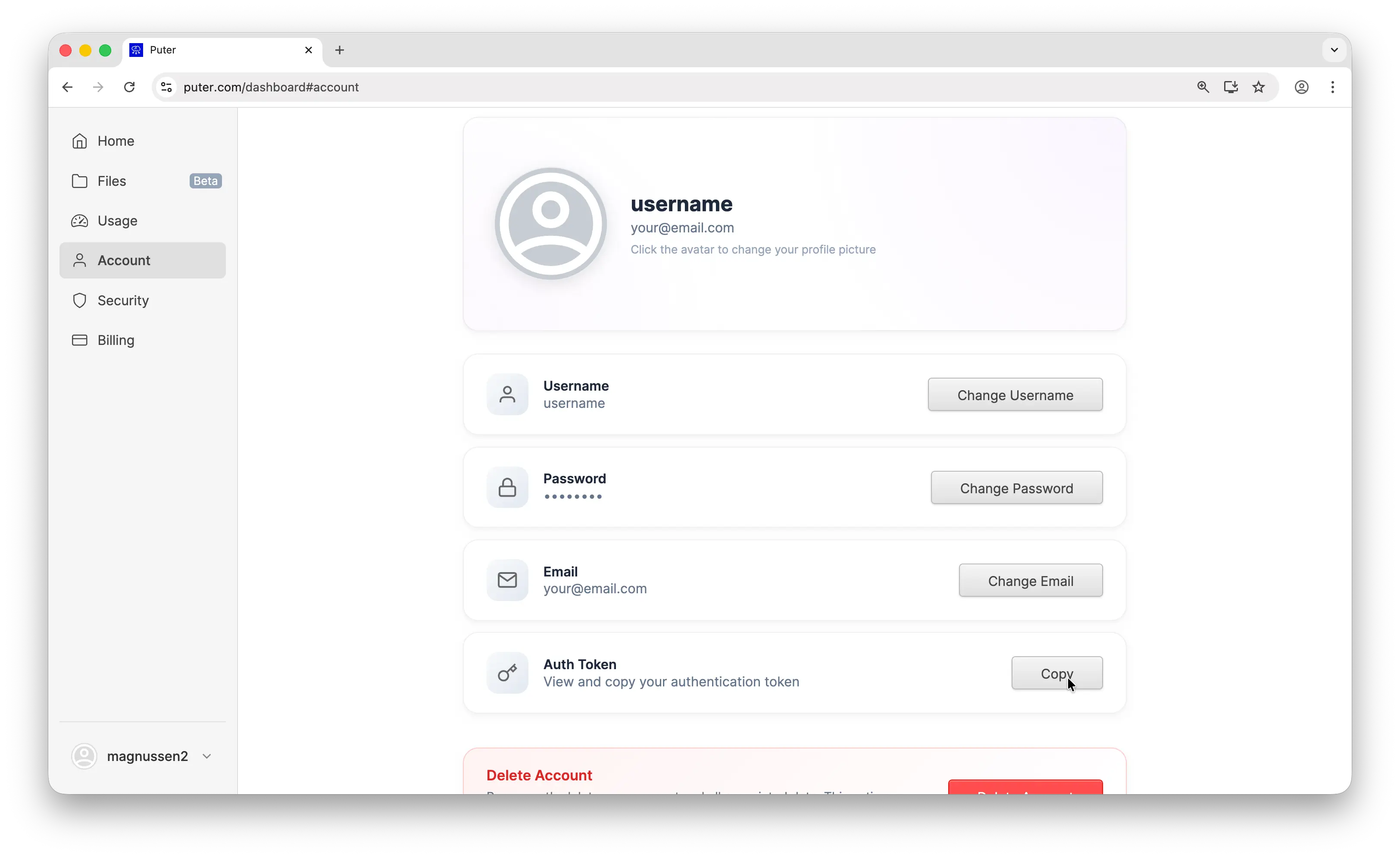
- Your Puter auth token, go to puter.com/dashboard and click Copy to get your auth token
Setup
Create a new project and install litellm:
uv init puter-litellm
cd puter-litellm
uv add litellm
Then use the completion() function with Puter's base URL and your auth token:
from litellm import completion

response = completion(
    model="openai/gpt-5-nano",
    api_base="https://api.puter.com/puterai/openai/v1/",
    api_key="YOUR_PUTER_AUTH_TOKEN",
    messages=[
        {"role": "user", "content": "Hello!"},
    ],
)
Replace YOUR_PUTER_AUTH_TOKEN with the auth token you copied from your Puter dashboard. The openai/ prefix tells LiteLLM to route the request through an OpenAI-compatible endpoint. That's all you need to start making requests.
Example 1: Basic Chat Completion
Let's start with the simplest possible example, a single chat completion:
from litellm import completion

response = completion(
    model="openai/gpt-5-nano",
    api_base="https://api.puter.com/puterai/openai/v1/",
    api_key="YOUR_PUTER_AUTH_TOKEN",
    messages=[
        {"role": "user", "content": "What is the capital of France?"},
    ],
)

print(response.choices[0].message.content)
This sends a single message to gpt-5-nano and prints the response. The response format is identical to OpenAI's, so any code that works with OpenAI responses works here too.
Run it with:
uv run main.py
Example 2: Streaming
For longer responses, streaming gives you results in real-time as they're generated:
from litellm import completion

response = completion(
    model="openai/gpt-5-nano",
    api_base="https://api.puter.com/puterai/openai/v1/",
    api_key="YOUR_PUTER_AUTH_TOKEN",
    messages=[
        {"role": "user", "content": "Write a short story about a robot learning to paint."},
    ],
    stream=True,
)

for chunk in response:
    content = chunk.choices[0].delta.content
    if content:
        print(content, end="", flush=True)
Set stream=True and iterate over the chunks as they arrive. Each chunk contains a piece of the response that you can display immediately.
Example 3: Use a Non-OpenAI Model
This is where it gets interesting. Same code, same endpoint. Just swap the model name to use Claude, Gemini, Grok, or any other supported model. Keep the openai/ prefix since all models go through Puter's OpenAI-compatible endpoint:
from litellm import completion

# Use Claude
claude = completion(
    model="openai/claude-sonnet-4-5",
    api_base="https://api.puter.com/puterai/openai/v1/",
    api_key="YOUR_PUTER_AUTH_TOKEN",
    messages=[
        {"role": "user", "content": "What is the capital of France?"},
    ],
)
print("Claude:", claude.choices[0].message.content)

# Use Gemini
gemini = completion(
from litellm import completion
# Use Claude
claude = completion(
model="openai/claude-sonnet-4-5",
api_base="https://api.puter.com/puterai/openai/v1/",
api_key="YOUR_PUTER_AUTH_TOKEN",
messages=[
{"role": "user", "content": "What is the capital of France?"},
],
)
print("Claude:", claude.choices[0].message.content)
# Use Gemini
gemini = completion(from litellm import completion
# Use Claude
claude = completion(
model="openai/claude-sonnet-4-5",
api_base="https://api.puter.com/puterai/openai/v1/",
api_key="YOUR_PUTER_AUTH_TOKEN",
messages=[
{"role": "user", "content": "What is the capital of France?"},
],
)
print("Claude:", claude.choices[0].message.content)
# Use Gemini
gemini = completion(
model="openai/gemini-2.5-flash-lite",
api_base="https://api.puter.com/puterai/openai/v1/",
api_key="YOUR_PUTER_AUTH_TOKEN",
messages=[
{"role": "user", "content": "What is the capital of France?"},
],
)
print("Gemini:", gemini.choices[0].message.content)
# Use Grok
grok = completion(
model="openai/grok-4-1-fast",
api_base="https://api.puter.com/puterai/openai/v1/",
api_key="YOUR_PUTER_AUTH_TOKEN",
messages=[
{"role": "user", "content": "What is the capital of France?"},
],
)
print("Grok:", grok.choices[0].message.content)
One endpoint, any model. You don't need separate SDKs, separate API keys, or separate billing accounts. Switch between providers by changing a single string.
Example 4: Tool/Function Calling
Tool calling lets the model request structured data from your code. Here's an example with a simple get_weather tool:
import json
from litellm import completion

# Define the tool
tools = [
    {
        "type": "function",
        "function": {
            "name": "get_weather",
            "description": "Get the current weather for a given location",
            "parameters": {
                "type": "object",
                "properties": {
                    "location": {
                        "type": "string",
import json
from litellm import completion
# Define the tool
tools = [
{
"type": "function",
"function": {
"name": "get_weather",
"description": "Get the current weather for a given location",
"parameters": {
"type": "object",
"properties": {
"location": {
"type": "string",import json
from litellm import completion
# Define the tool
tools = [
{
"type": "function",
"function": {
"name": "get_weather",
"description": "Get the current weather for a given location",
"parameters": {
"type": "object",
"properties": {
"location": {
"type": "string",
"description": "City name, e.g. San Francisco",
},
},
"required": ["location"],
},
},
},
]
# Send the request with tools
response = completion(
model="openai/gpt-5-nano",
api_base="https://api.puter.com/puterai/openai/v1/",
api_key="YOUR_PUTER_AUTH_TOKEN",
messages=[
{"role": "user", "content": "What's the weather like in Tokyo?"},
],
tools=tools,
)
# Handle the tool call
tool_call = response.choices[0].message.tool_calls[0]
if tool_call:
args = json.loads(tool_call.function.arguments)
print(f"Model wants to call: {tool_call.function.name}")
print(f"With arguments: {args}")
# Simulate a tool response
tool_result = json.dumps({"temperature": "22°C", "condition": "Partly cloudy"})
# Send the tool result back to the model
final_response = completion(
model="openai/gpt-5-nano",
api_base="https://api.puter.com/puterai/openai/v1/",
api_key="YOUR_PUTER_AUTH_TOKEN",
messages=[
{"role": "user", "content": "What's the weather like in Tokyo?"},
response.choices[0].message,
{
"role": "tool",
"tool_call_id": tool_call.id,
"content": tool_result,
},
],
tools=tools,
)
print(final_response.choices[0].message.content)
The model analyzes the user's question, decides it needs weather data, and returns a structured tool call. Your code executes the function, sends the result back, and the model generates a final response using that data.
Conclusion
That's it. You now have LiteLLM connected to Puter, giving you access to GPT, Claude, Gemini, Grok, and more through a single completion() call. No need to juggle multiple API keys or rewrite your code when you want to try a different model.
To go further, check out the full Puter.js documentation or browse the complete list of supported AI models. You can also learn more about LiteLLM's documentation for additional features like cost tracking, fallbacks, and load balancing.
Related
- How to Use OpenAI SDK with Puter
- How to Use LangChain with Puter
- How to Use OpenRouter SDK with Puter
- How to Use Vercel AI SDK with Puter
- How to Use Cline with Puter
- How to Use Claude Code with Puter
- How to Use Kilo Code with Puter
- How to Use Roo Code with Puter
- How to Use BLACKBOX AI with Puter
- How to Use SillyTavern with Puter
- How to Use Janitor AI with Puter
- How to Use OpenHands with Puter
- Free, Unlimited OpenAI API
- Free, Unlimited Claude API
- Free, Unlimited Gemini API
- Free, Unlimited Grok API
- Free, Unlimited AI API
- Getting Started with Puter.js
Free, Serverless AI and Cloud
Start creating powerful web applications with Puter.js in seconds!
Get Started Now