How to Use LiteLLM with OpenAI, Claude, Gemini & More
On this page
In this tutorial, you'll learn how to use LiteLLM with OpenAI, Claude, Gemini, Grok, and more through Puter's OpenAI-compatible endpoint.
LiteLLM is a Python library that lets you call 100+ LLM APIs using a single completion() function. Instead of learning different SDKs for each provider, you write one piece of code and swap models by changing a string. Pair it with Puter and you get every model without needing separate API keys from each provider.
Prerequisites
- A Puter account
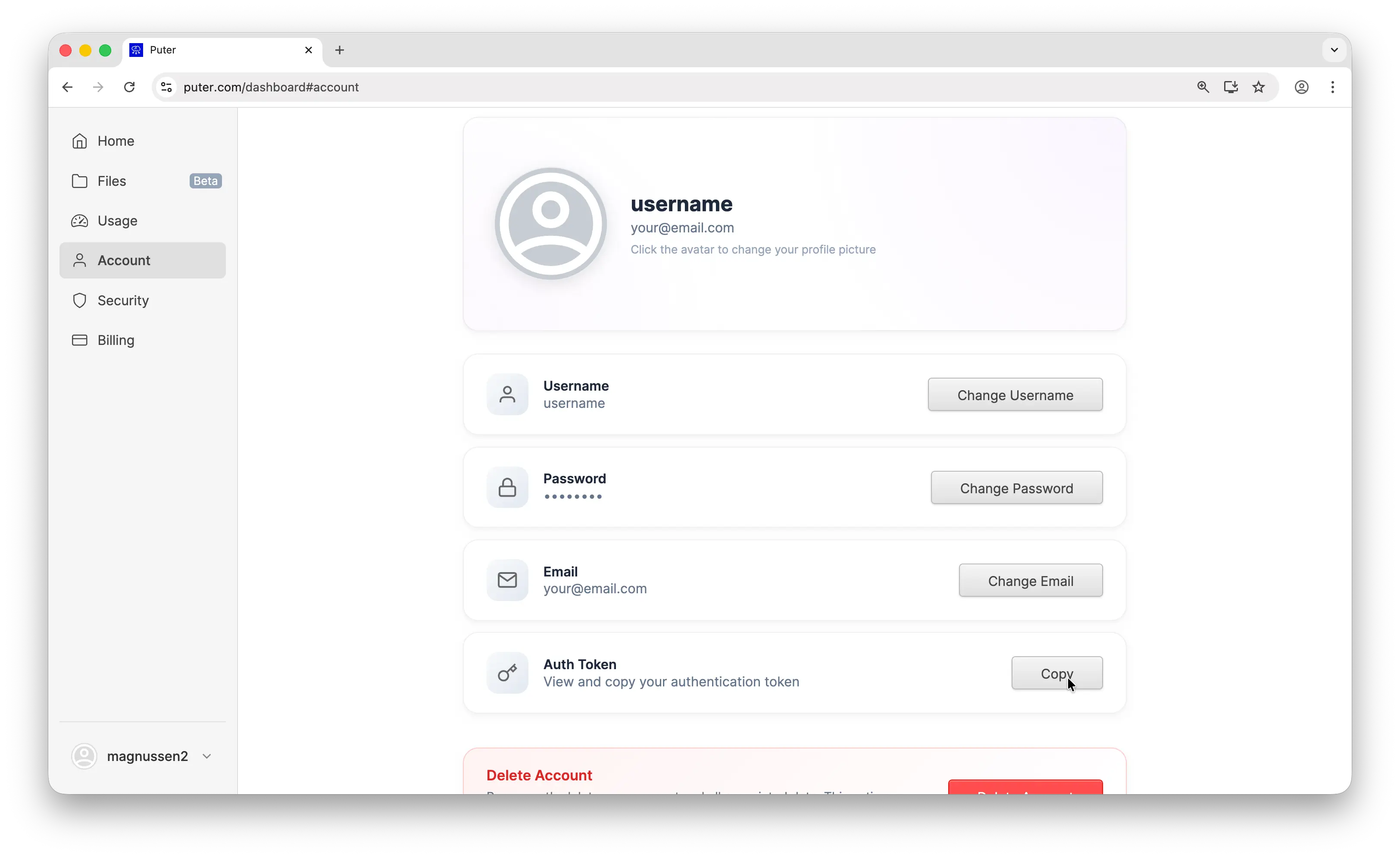
- Your Puter auth token, go to puter.com/dashboard and click Copy to get your auth token
Setup
Create a new project and install litellm:
uv init puter-litellm
cd puter-litellm
uv add litellm
Then configure the completion() call with Puter's base URL and your auth token:
from litellm import completion

# Configure LiteLLM to use Puter's OpenAI-compatible endpoint
# This single setup works for GPT, Claude, Gemini, Grok, and all other models
response = completion(
    model="openai/gpt-5-nano",
    api_base="https://api.puter.com/puterai/openai/v1/",
    api_key="YOUR_PUTER_AUTH_TOKEN",
    messages=[
        {"role": "user", "content": "What is the capital of France?"},
    ],
)

print(response.choices[0].message.content)
Replace YOUR_PUTER_AUTH_TOKEN with the auth token you copied from your Puter dashboard. The openai/ prefix tells LiteLLM to route through an OpenAI-compatible endpoint. Run it with:
uv run main.py
Sample output:
The capital of France is Paris.
Why Use Puter as Your Provider
LiteLLM already supports 100+ models through a single function, but you still need an API key for each provider:
# The traditional way — one API key per provider
export OPENAI_API_KEY="sk-..."       # for GPT models
export ANTHROPIC_API_KEY="sk-ant-..."  # for Claude models
export GEMINI_API_KEY="AIza..."       # for Gemini models
Each provider requires its own account, its own billing, and its own key management. With Puter, you replace all of that with a single auth token. Every model — GPT, Claude, Gemini, Grok, Llama, DeepSeek, and hundreds more — is accessible through one endpoint and one key. No separate accounts, no separate billing.
Switching Models
Same code, same setup. Just change the model string to use any supported model:
from litellm import completion

PUTER_BASE = "https://api.puter.com/puterai/openai/v1/"
PUTER_KEY = "YOUR_PUTER_AUTH_TOKEN"

# Use Claude — no Anthropic API key needed
response = completion(
    model="openai/claude-sonnet-4-5",
    api_base=PUTER_BASE,
    api_key=PUTER_KEY,
    messages=[{"role": "user", "content": "What is the capital of France?"}],
)
print("Claude:", response.choices[0].message.content)

# Use Gemini — no Google AI API key needed
from litellm import completion
PUTER_BASE = "https://api.puter.com/puterai/openai/v1/"
PUTER_KEY = "YOUR_PUTER_AUTH_TOKEN"
# Use Claude — no Anthropic API key needed
response = completion(
model="openai/claude-sonnet-4-5",
api_base=PUTER_BASE,
api_key=PUTER_KEY,
messages=[{"role": "user", "content": "What is the capital of France?"}],
)
print("Claude:", response.choices[0].message.content)
# Use Gemini — no Google AI API key neededfrom litellm import completion
PUTER_BASE = "https://api.puter.com/puterai/openai/v1/"
PUTER_KEY = "YOUR_PUTER_AUTH_TOKEN"
# Use Claude — no Anthropic API key needed
response = completion(
model="openai/claude-sonnet-4-5",
api_base=PUTER_BASE,
api_key=PUTER_KEY,
messages=[{"role": "user", "content": "What is the capital of France?"}],
)
print("Claude:", response.choices[0].message.content)
# Use Gemini — no Google AI API key needed
response = completion(
model="openai/gemini-2.5-flash-lite",
api_base=PUTER_BASE,
api_key=PUTER_KEY,
messages=[{"role": "user", "content": "What is the capital of France?"}],
)
print("Gemini:", response.choices[0].message.content)
# Use Grok — no xAI API key needed
response = completion(
model="openai/grok-4-1-fast",
api_base=PUTER_BASE,
api_key=PUTER_KEY,
messages=[{"role": "user", "content": "What is the capital of France?"}],
)
print("Grok:", response.choices[0].message.content)
One endpoint, any model. You don't need separate API keys or separate billing accounts. Switch between providers by changing a single string.
Supported Models
Puter gives you access to hundreds of models from dozens of providers through this single endpoint. Here are some of the most popular ones:
| Provider | Example Models |
|---|---|
| OpenAI | GPT-5, GPT-5 Nano, GPT-4.1, GPT-4o |
| Anthropic | Claude Opus 4.6, Claude Sonnet 4.5, Claude Haiku 4.5 |
| Gemini 2.5 Flash, Gemini 2.5 Flash-Lite | |
| xAI | Grok 4.1 Fast, Grok 4 |
| Meta | Llama 4, Llama 3.3 |
| DeepSeek | DeepSeek V3.2, DeepSeek R1 |
| Mistral | Mistral Large, Mistral Small |
Browse the full list of supported AI models.
Streaming
For longer responses, stream the response so you can display tokens as they arrive:
from litellm import completion

response = completion(
    model="openai/claude-sonnet-4-5",
    api_base="https://api.puter.com/puterai/openai/v1/",
    api_key="YOUR_PUTER_AUTH_TOKEN",
    messages=[
        {"role": "user", "content": "Write a short story about a robot learning to paint."},
    ],
    stream=True,
)

for chunk in response:
    content = chunk.choices[0].delta.content
    if content:
        print(content, end="", flush=True)
Set stream=True and iterate over the chunks. This works with any model.
Conclusion
That's it. LiteLLM plus Puter gives you a single completion() call that works across GPT, Claude, Gemini, Grok, and every other model Puter supports. No provider API keys, no SDK juggling, just swap the model string.
Related
- How to Use LiteLLM with Puter
- How to Use OpenAI SDK with Puter
- Access Any Model Using LangChain
- Access Claude Using OpenAI-Compatible API
- Access Gemini Using OpenAI-Compatible API
- Access Grok Using OpenAI-Compatible API
- Access Llama Using OpenAI-Compatible API
- Access DeepSeek Using OpenAI-Compatible API
- Free, Unlimited AI API
- Supported AI Models
Free, Serverless AI and Cloud
Start creating powerful web applications with Puter.js in seconds!
Get Started Now