Use Claude, GPT, Gemini & More in LangChain with One API
On this page
In this tutorial, you'll learn how to access any AI model using LangChain through Puter's OpenAI-compatible endpoint. GPT, Claude, Gemini, Grok, DeepSeek, Llama, and more, all through a single endpoint. No separate API keys needed, just your Puter auth token.
Prerequisites
- A Puter account
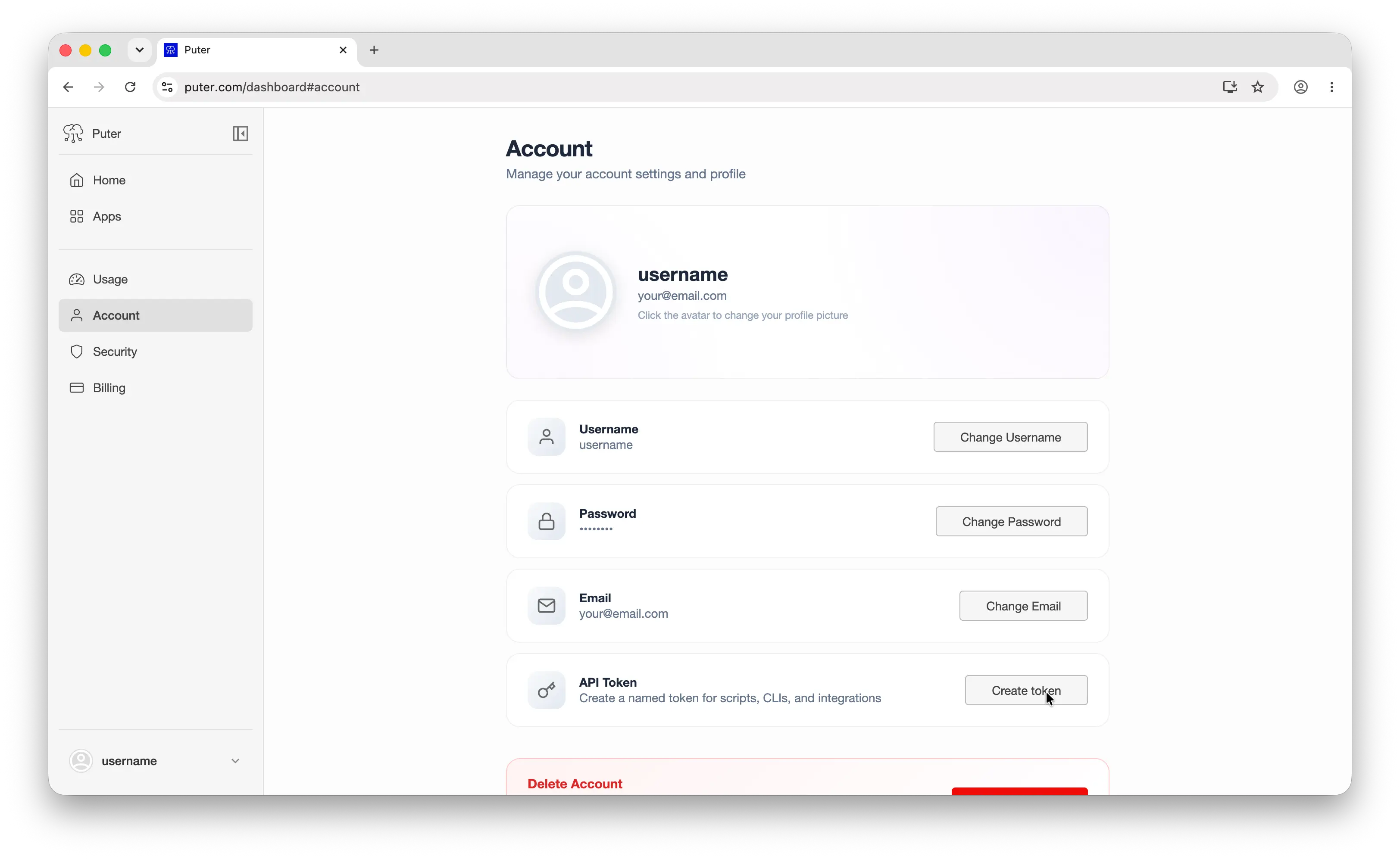
- Your Puter auth token, go to puter.com/dashboard and click Create token to get your auth token
Setup
Create a new project and install langchain-openai:
uv init puter-langchain
cd puter-langchain
uv add langchain-openai
Then configure the client with Puter's base URL and your auth token:
from langchain_openai import ChatOpenAI

# Configure LangChain to use Puter's OpenAI-compatible endpoint
# This single setup works for GPT, Claude, Gemini, Grok, and all other models
llm = ChatOpenAI(
    base_url="https://api.puter.com/puterai/openai/v1/",
    api_key="YOUR_PUTER_AUTH_TOKEN",
    model="gpt-5.4-nano",
)
Replace YOUR_PUTER_AUTH_TOKEN with the auth token you copied from your Puter dashboard. That's all you need. No separate API keys required for any model.
Why Use a Unified Endpoint
Normally, using multiple LLM providers in LangChain means installing a separate package for each one:
# The traditional way — one package per provider
pip install langchain-openai        # for GPT models
pip install langchain-anthropic     # for Claude models
pip install langchain-google-genai  # for Gemini models
Each package requires its own API key, its own billing account, and its own configuration. Switching providers means rewriting your code to use different classes like ChatAnthropic or ChatGoogleGenerativeAI.
With Puter's OpenAI-compatible endpoint, you only need langchain-openai. Every model — GPT, Claude, Gemini, Grok, Llama, DeepSeek, and hundreds more — is accessible through a single ChatOpenAI class, a single API key, and a single billing account. Switching models is just changing a string. This makes it easy to compare models, run benchmarks, or swap providers without touching your code.
Basic Chat Completion
Here's a simple chat completion using GPT:
from langchain_openai import ChatOpenAI

# Create a GPT-5.4 Nano instance through Puter's unified API
llm = ChatOpenAI(
    base_url="https://api.puter.com/puterai/openai/v1/",
    api_key="YOUR_PUTER_AUTH_TOKEN",
    model="gpt-5.4-nano",
)

response = llm.invoke("What is the capital of France?")
print(response.text)
Sample output:
The capital of France is Paris.
The code is identical to what you'd write for OpenAI directly. The only difference is the base URL and auth token. Run it with:
uv run main.py
Switching Models
This is where it gets interesting. Same code, same setup. Just change the model parameter to use any supported model:
from langchain_openai import ChatOpenAI

# Use Claude — no Anthropic API key needed
claude = ChatOpenAI(
    base_url="https://api.puter.com/puterai/openai/v1/",
    api_key="YOUR_PUTER_AUTH_TOKEN",
    model="claude-sonnet-5",
)
print("Claude:", claude.invoke("What is the capital of France?").text)

# Use Gemini — no Google AI API key needed
gemini = ChatOpenAI(
    base_url="https://api.puter.com/puterai/openai/v1/",
    api_key="YOUR_PUTER_AUTH_TOKEN",
    model="gemini-3.5-flash-lite",
)
print("Gemini:", gemini.invoke("What is the capital of France?").text)

# Use Grok — no xAI API key needed
grok = ChatOpenAI(
    base_url="https://api.puter.com/puterai/openai/v1/",
    api_key="YOUR_PUTER_AUTH_TOKEN",
    model="grok-4.7",
)
print("Grok:", grok.invoke("What is the capital of France?").text)
One endpoint, any model. You don't need separate SDKs, separate API keys, or separate billing accounts. Switch between providers by changing a single string.
Supported Models
Puter gives you access to hundreds of models from dozens of providers through this single endpoint. Here are some of the most popular ones:
| Provider | Example Models |
|---|---|
| OpenAI | GPT-5.5, GPT-5.4 Nano, GPT-4.1, GPT-4o |
| Anthropic | Claude Opus 4.8, Claude Sonnet 5, Claude Haiku 4.5 |
| Gemini 3.6 Flash, Gemini 3.5 Flash-Lite | |
| xAI | Grok 4.3, Grok 4.1 Fast Non-Reasoning |
| Meta | Llama 4, Llama 3.3 |
| DeepSeek | DeepSeek V4 Flash, DeepSeek V4 Pro |
| Mistral | Mistral Large, Mistral Small |
Browse the full list of supported AI models.
Model Comparison
One of the most useful things about a unified endpoint is comparing how different models respond to the same prompt. Here's a quick way to benchmark multiple models:
from langchain_openai import ChatOpenAI

# Compare responses from GPT, Claude, and Gemini side by side
models = ["gpt-5.4-nano", "claude-sonnet-5", "gemini-3.5-flash-lite"]

for model in models:
    llm = ChatOpenAI(
        base_url="https://api.puter.com/puterai/openai/v1/",
        api_key="YOUR_PUTER_AUTH_TOKEN",
        model=model,
    )
    response = llm.invoke("Explain recursion in one sentence.")
    print(f"{model}: {response.text}")
Sample output:
gpt-5.4-nano: Recursion is when a function calls itself to solve a smaller version of the same problem until it reaches a base case.
claude-sonnet-5: Recursion is a technique where a function calls itself with a simpler input until reaching a base case that can be solved directly.
gemini-3.5-flash-lite: Recursion is a programming technique where a function solves a problem by calling itself on progressively smaller subproblems until a trivial base case is reached.
No API key juggling, no code changes between providers. Just swap the model string and compare.
Streaming
For longer responses, streaming gives you results in real-time as they're generated:
from langchain_openai import ChatOpenAI

# Stream a response from Claude using Puter's endpoint
llm = ChatOpenAI(
    base_url="https://api.puter.com/puterai/openai/v1/",
    api_key="YOUR_PUTER_AUTH_TOKEN",
    model="claude-sonnet-5",
)

# Use stream() instead of invoke() to get chunks as they're generated
for chunk in llm.stream("Write a short story about a robot learning to paint."):
    print(chunk.text, end="", flush=True)
Use stream instead of invoke and iterate over the chunks as they arrive. Each chunk contains a piece of the response that you can display immediately. This works with any model.
Conclusion
That's it. You now have LangChain connected to any AI model through Puter — GPT, Claude, Gemini, Grok, and more through a single endpoint. No need to juggle multiple API keys or rewrite your code when you want to try a different model. Just swap the model string.
Related
- How to Use LangChain with Puter
- How to Use OpenAI SDK with Puter
- Access Claude Using OpenAI-Compatible API
- Access Gemini Using OpenAI-Compatible API
- Access Grok Using OpenAI-Compatible API
- Access Llama Using OpenAI-Compatible API
- Access DeepSeek Using OpenAI-Compatible API
- Free, Unlimited AI API
- Supported AI Models
Ship a Full-Stack App with One Prompt
Build an AI chat app using Puter.js
Coding manually? see the guide