Nano Banana 2 Lite Review: Testing Google's "Fastest, Most Cost-Efficient" Claim
We recently added Nano Banana 2 Lite to Puter.js. It's the marketing name for Gemini 3.1 Flash Lite Image, and Google recommends it as the replacement for the original Nano Banana (Gemini 2.5 Flash Image).
Google's pitch in the announcement is that this is their "fastest, most cost-efficient Gemini Image model", generating a 1K image in about 4 seconds. We tested that claim.
Testing the Speed Claim
Since the claim is about Google's own image family, we compared Nano Banana 2 Lite against the three other Nano Banana models on Puter.js. Those are Nano Banana 2, Nano Banana Pro, and the original Nano Banana it replaces.
We used the same prompt for all four and timed each one end to end from the browser, averaging three runs each. These are the times a real user waits for, network and queueing included, not raw GPU time.
The prompt is built to exercise the three qualities Google says the Lite model keeps, which are prompt adherence, character consistency, and legible in-image text rendering. It asks for the same character three times in one image, plus rendered text:
<html>
<body>
  <script src="https://js.puter.com/v2/"></script>
  <script>
    const prompt = "A children's book page showing the same red fox in a blue scarf three times: reading under a tree, napping on a rock, and chasing a butterfly, with the title 'The Quiet Hour' hand-lettered at the top";

    const models = [
      { label: "Nano Banana 2 Lite", opts: { model: "gemini-3.1-flash-lite-image" } },
      { label: "Nano Banana",        opts: { model: "gemini-2.5-flash-image" } },
      { label: "Nano Banana 2",      opts: { model: "gemini-3.1-flash-image" } },
      { label: "Nano Banana Pro",    opts: { model: "gemini-3-pro-image" } },
    ];

    async function runModel(opts, runs = 3) {
      const times = [];
<html>
<body>
<script src="https://js.puter.com/v2/"></script>
<script>
const prompt = "A children's book page showing the same red fox in a blue scarf three times: reading under a tree, napping on a rock, and chasing a butterfly, with the title 'The Quiet Hour' hand-lettered at the top";
const models = [
{ label: "Nano Banana 2 Lite", opts: { model: "gemini-3.1-flash-lite-image" } },
{ label: "Nano Banana", opts: { model: "gemini-2.5-flash-image" } },
{ label: "Nano Banana 2", opts: { model: "gemini-3.1-flash-image" } },
{ label: "Nano Banana Pro", opts: { model: "gemini-3-pro-image" } },
];
async function runModel(opts, runs = 3) {
const times = [];<html>
<body>
<script src="https://js.puter.com/v2/"></script>
<script>
const prompt = "A children's book page showing the same red fox in a blue scarf three times: reading under a tree, napping on a rock, and chasing a butterfly, with the title 'The Quiet Hour' hand-lettered at the top";
const models = [
{ label: "Nano Banana 2 Lite", opts: { model: "gemini-3.1-flash-lite-image" } },
{ label: "Nano Banana", opts: { model: "gemini-2.5-flash-image" } },
{ label: "Nano Banana 2", opts: { model: "gemini-3.1-flash-image" } },
{ label: "Nano Banana Pro", opts: { model: "gemini-3-pro-image" } },
];
async function runModel(opts, runs = 3) {
const times = [];
let image;
for (let i = 0; i < runs; i++) {
const start = performance.now();
image = await puter.ai.txt2img(prompt, opts); // returns an <img> element
times.push(performance.now() - start);
}
const mean = times.reduce((a, b) => a + b, 0) / times.length;
return { seconds: mean / 1000, image };
}
(async () => {
// run every model at once, then render in order once they all finish
const results = await Promise.all(
models.map(async ({ label, opts }) => ({ label, ...(await runModel(opts)) }))
);
for (const { label, seconds, image } of results) {
const card = document.createElement("figure");
const caption = document.createElement("figcaption");
caption.textContent = `${label}: ${seconds.toFixed(2)}s`;
image.style.maxWidth = "320px";
card.append(caption, image);
document.body.appendChild(card);
}
})();
</script>
</body>
</html>
You can run it yourself in the Puter playground, or drop it into a page on your own site.
What We Found
Average seconds per image over three runs, lower is faster:
| Model | Average time per image |
|---|---|
| Nano Banana 2 Lite | 3.23 s |
| Nano Banana | 11.13 s |
| Nano Banana 2 | 7.73 s |
| Nano Banana Pro | 17.02 s |
Nano Banana 2 Lite came in at 3.23 seconds per image, about 2.4x faster than Nano Banana 2, the next fastest model in the set. Against the original Nano Banana it replaces, it was about 3.4x faster. Nano Banana Pro, the highest-quality tier, was the slowest at 17.02 seconds, about 5.3x slower than Lite.
Google's announcement says about 4 seconds per image. In our runs it averaged 3.23 seconds, under the stated figure, so the claim holds.
Image quality is subjective, so generate a few and judge for yourself. Judged on Google's own criteria for the model (prompt adherence, character consistency, and in-image text rendering), the output hit all three in our runs. The scene matched the prompt, the fox stayed consistent across the three poses, and the title text rendered legibly.
Here is each model on the same prompt:
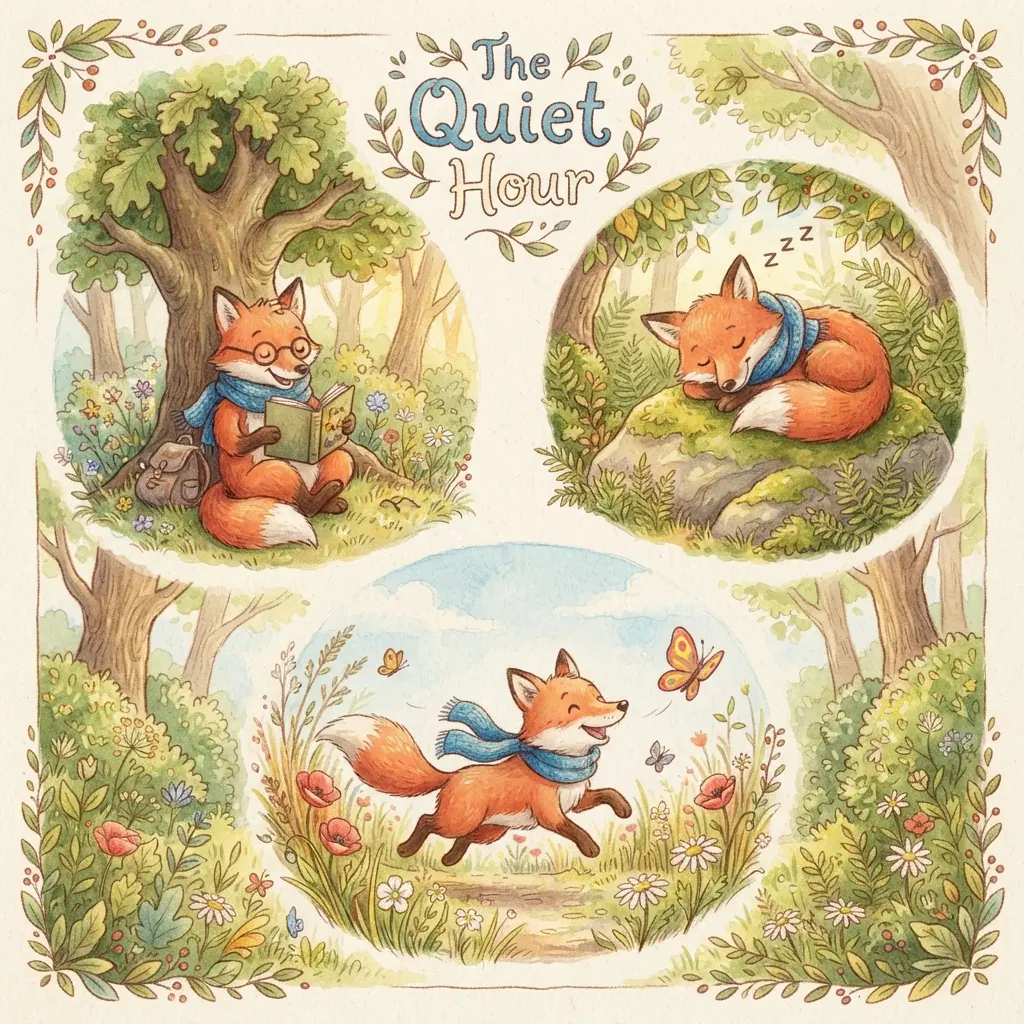
Nano Banana 2 Lite

Nano Banana
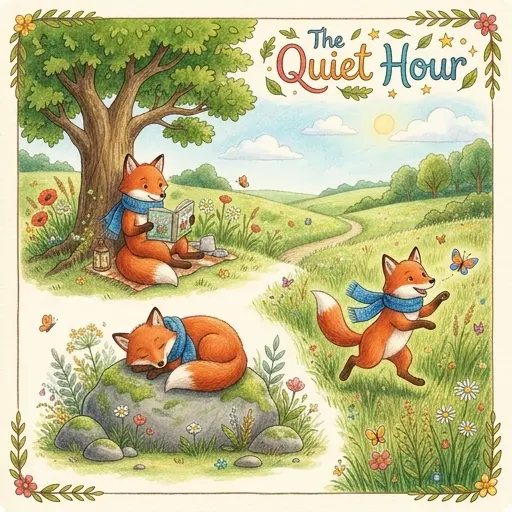
Nano Banana 2

Nano Banana Pro
Pricing
Here is the per-image price for each model on Puter.js:
| Model | Price per image |
|---|---|
| Nano Banana 2 Lite | $0.0336 |
| Nano Banana | $0.039 |
| Nano Banana 2 | $0.067 |
| Nano Banana Pro | $0.1351 |
Nano Banana 2 Lite is the cheapest of the four, so on price the "most cost-efficient" half of the claim holds within the family. It's half the price of Nano Banana 2 and about a quarter the price of Nano Banana Pro. The gap to the original Nano Banana it replaces is smaller, about 14%, so the upgrade is less about price and more about speed.
On Puter's User-Pays model each user covers their own usage, so the per-image price lands on them rather than on you as the developer.
Conclusion
Nano Banana 2 Lite is the cheapest model in the Nano Banana family at $0.0336 per image, half the price of Nano Banana 2 and about 4x cheaper than Nano Banana Pro. On speed, our test confirms Google's claim. It was the fastest of the four Nano Banana models at 3.23 seconds per image, under Google's own 4-second figure and 2.4x faster than the next fastest model.
Try It Yourself
Nano Banana 2 Lite is available on Puter.js now. Paste the timing harness above into the Puter playground and see what numbers you get. Puter.js lets you add AI to your app with no API keys and no server, and since each user covers their own usage, it costs you nothing as the developer.
From a script tag:
<html>
<body>
    <script src="https://js.puter.com/v2/"></script>
    <script>
        puter.ai.txt2img(
            "A children's book page showing the same red fox in a blue scarf three times: reading under a tree, napping on a rock, and chasing a butterfly, with the title 'The Quiet Hour' hand-lettered at the top",
            { model: "gemini-3.1-flash-lite-image" }
        ).then(image => document.body.appendChild(image));
    </script>
</body>
</html>
Or from npm with @heyputer/puter.js:
// npm install @heyputer/puter.js
import { puter } from "@heyputer/puter.js";

const image = await puter.ai.txt2img("...", { model: "gemini-3.1-flash-lite-image" });
document.body.appendChild(image);
Both expose the same puter.* API.
Related
Ship a Full-Stack App with One Prompt
Create a to-do list app using Puter.js
Coding manually? see the guide