GPT Image 2.6 Review: Faster Flare and Closer Prompt Following
On this page
GPT Image 2.6 comes as two models, Flare and Sunburst. OpenAI's launch post leads with speed, saying Images 2.6 "generates images 50% faster than before." We timed both models against GPT Image 2.5 Flare and GPT Image 2.5 Sunburst on the same poster prompt at three quality settings, three runs each.
In our runs, GPT Image 2.6 Flare took 21% to 50% less time than 2.5 Flare, and the gap grew with quality. At high quality it finished in half the time. GPT Image 2.6 Sunburst was slower than 2.5 Sunburst at every quality setting, by 11% to 39%, at the API's default complexity. All 36 images spelled their text correctly. At low and medium quality, a 2.6 image costs 4.2 and 3.3 times as much as a 2.5 image, while high quality costs the same.
What's new in GPT Image 2.6
OpenAI positions the two models differently. Flare is the fast one. OpenAI says it can return a low-quality image in about six seconds at best, and that it lays out posters and product images better than before. Sunburst is meant for detailed work and for keeping images consistent across edits, at medium or high quality.
The API also gets four additions, all available on both models according to OpenAI's image generation guide:
- Complexity. A
complexitysetting oflow,medium, orhighcontrols how much the model plans before it renders, separately fromquality. It defaults tohighand has no extra fee. OpenAI notes that higher complexity can add latency, and recommends low complexity for most quick edits. - Markup-guided edits. An edit request can include a transparent PNG with marks drawn over the image to show where to change it.
- SVG output. Setting
output_formattosvgreturns vector output from the generations endpoint. - Animated GIFs. Setting
output_formattogifreturns an animation, withframe_count(2 to 16 frames) andframe_duration_mssetting its length and pace.
Token prices are unchanged from GPT Image 2.5, at $5 per million text input tokens, $8 per million image input tokens, and $30 per million image output tokens (OpenAI pricing). The number of output tokens per image did change, which we cover in the cost section below.
How we tested
We reused the poster prompt from our GPT Image 2.5 review. It asks for a fixed layout with three pieces of text.
Mid-century modern travel poster for a fictional town, portrait orientation. Top third: the title "PORT AVERLY" in bold condensed sans-serif. Center: a lighthouse on a cliff at sunset in flat screenprint style, limited to teal, cream, coral, mustard, and navy. Bottom: a navy band with cream text reading "Ferry departs daily at 7:15 AM from Pier 4". Lower right: a small circular badge reading "EST. 1952".
We ran it on all four models at low, medium, and high quality, at 1024x1536, three times each, for 36 images. Requests went one at a time, and we rotated the order of the models each round. Each time covers sending the request to receiving the finished image, so it includes network time. All requests used the default complexity, because Puter.js doesn't expose the complexity setting yet.
Generation time
Median of three runs, in seconds:
| Quality | 2.5 Flare | 2.6 Flare | 2.6 vs 2.5 | 2.5 Sunburst | 2.6 Sunburst | 2.6 vs 2.5 |
|---|---|---|---|---|---|---|
| Low | 11.4 | 9.0 | −21% | 17.0 | 23.6 | +39% |
| Medium | 13.9 | 9.4 | −32% | 21.3 | 26.6 | +25% |
| High | 21.0 | 10.6 | −50% | 41.0 | 45.5 | +11% |
Flare. The 2.6 Flare times barely changed with quality. Its nine runs ranged from 8.1 to 12.3 seconds, while 2.5 Flare went from about 11 seconds at low quality to 21 at high. In the median, 2.6 Flare at high quality finished faster than 2.5 Flare at low quality. At high quality, the 50% figure from OpenAI's launch post matches our median.
Our fastest low-quality Flare image took 8.1 seconds, slower than OpenAI's six-second figure. OpenAI gives six seconds as the lower bound. Our images were portrait rather than square, and OpenAI's guide says square images are usually fastest. Our times also include downloading the image.
Sunburst. GPT Image 2.6 Sunburst was slower than 2.5 Sunburst in the median at every quality, with the largest gap at low quality (23.6 against 17.0 seconds). At high quality the ranges overlapped, with 2.6 Sunburst between 41.5 and 48.4 seconds and 2.5 Sunburst between 33.2 and 42.5 seconds. Our runs used the default high complexity. OpenAI says higher complexity can add latency, so Sunburst may be faster at a lower complexity setting, which we couldn't test.
Within 2.6, Sunburst took 2.6 times as long as Flare at low quality, 2.8 times at medium, and 4.3 times at high.
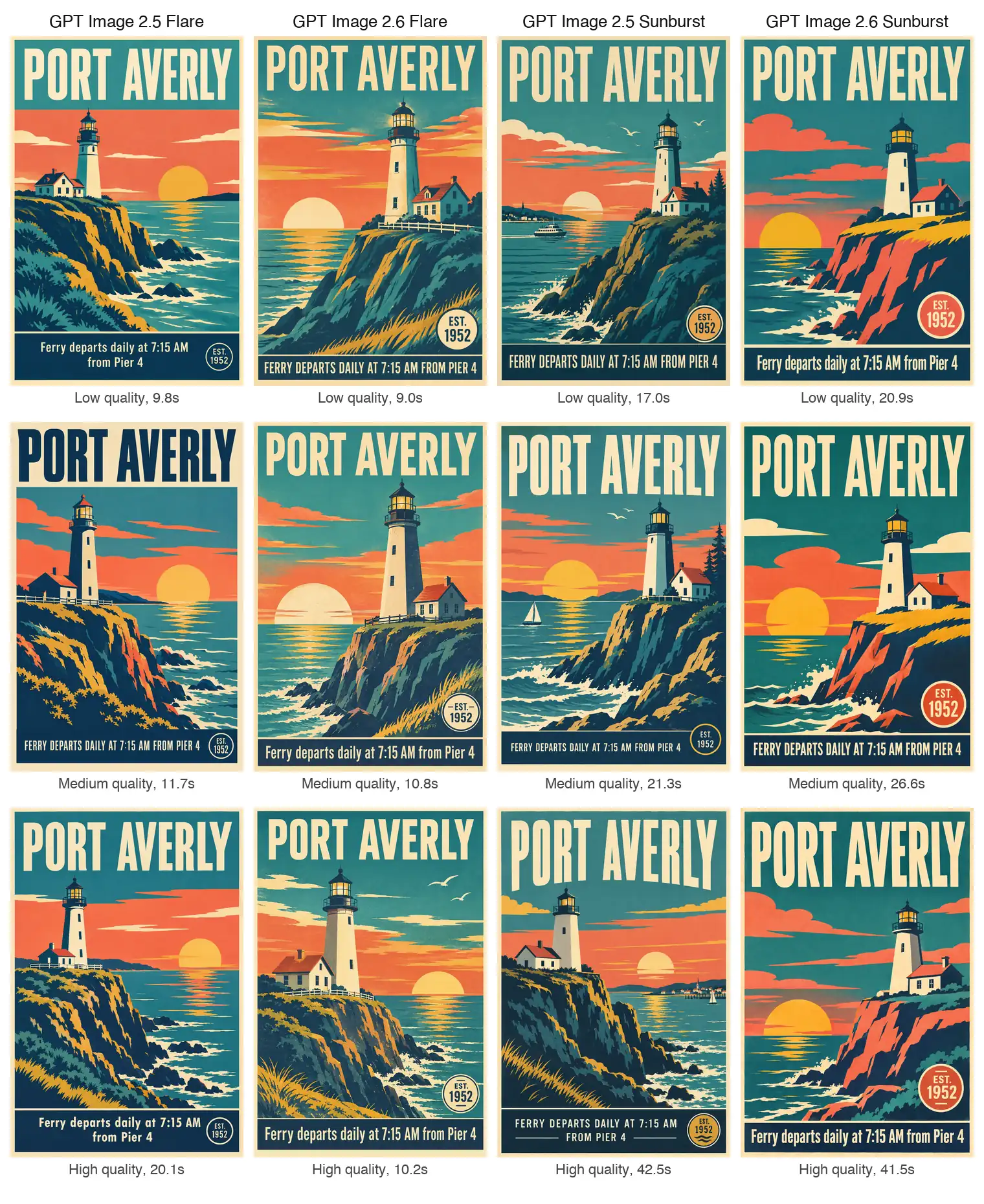
All 12 posters from our second round, with the generation time of each image. The table above uses the median of all three rounds.
Cost per image
OpenAI's cost calculator gives these output costs for a 1024x1024 image:
| Quality | 2.5 output tokens | 2.5 cost | 2.6 output tokens | 2.6 cost | 2.6 vs 2.5 |
|---|---|---|---|---|---|
| Low | 196 | $0.0059 | 823 | $0.0247 | 4.2× |
| Medium | 439 | $0.0132 | 1,449 | $0.0435 | 3.3× |
| High | 1,756 | $0.0527 | 1,756 | $0.0527 | 1× |
The price per token is the same, but 2.6 produces more output tokens per image at low and medium quality. A low-quality 2.6 image now costs more than a medium-quality 2.5 image. Flare and Sunburst cost the same per image within each version. Puter's model pages list the same $0.0247 for a low-quality 1024x1024 image.
This changes the trade-off between quality settings. On 2.5 Flare, low quality was 89% cheaper than high and about 46% faster in our runs. On 2.6 Flare, low quality is 53% cheaper than high, and it saved 1.6 seconds in our median times.
Text and layout
All 36 images followed the layout, with the title at the top, the lighthouse in the center, and the navy band at the bottom. We checked each image against the prompt:
| Check | 2.5 Flare | 2.6 Flare | 2.5 Sunburst | 2.6 Sunburst |
|---|---|---|---|---|
| "PORT AVERLY" spelled correctly | 9/9 | 9/9 | 9/9 | 9/9 |
| Ferry line spelled correctly | 9/9 | 9/9 | 9/9 | 9/9 |
| Ferry line in the prompt's capitalization | 8/9 | 5/9 | 0/9 | 3/9 |
| Stray marks or odd letterforms in the text | 1 | 1 | 0 | 0 |
| Badge inside the navy band | 9/9 | 0/9 | 7/9 | 0/9 |
| Boats or a town not in the prompt | 1/9 | 0/9 | 9/9 | 2/9 |
Every image spelled all three pieces of text correctly, including at low quality. The two flaws were small. One 2.5 Flare image used a small capital "T" in "departs" and "at" and had a stray mark next to it, and one 2.6 Flare image had a dot between "Pier" and "4".
GPT Image 2.5 Sunburst added boats, a harbor town, or a pier on the far shore in all nine of its images, as it did in our 2.5 review. The 2.6 version did it twice. Both 2.6 models placed the "EST. 1952" badge above the navy band, and larger, in every image, where the 2.5 models mostly placed it inside the band. The prompt only asked for the lower right, so both placements follow it.
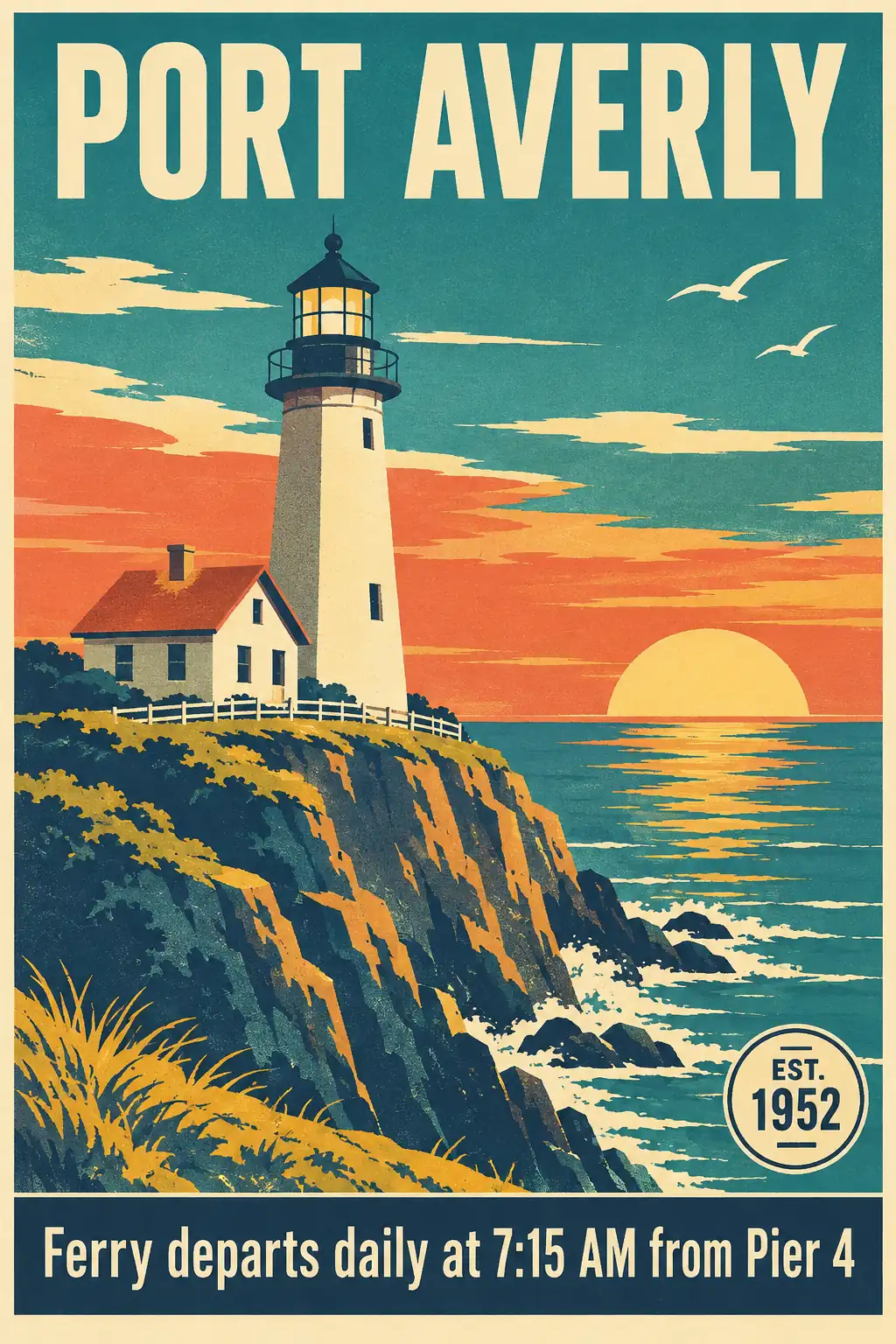
GPT Image 2.6 Flare at high quality, 10.2 seconds.
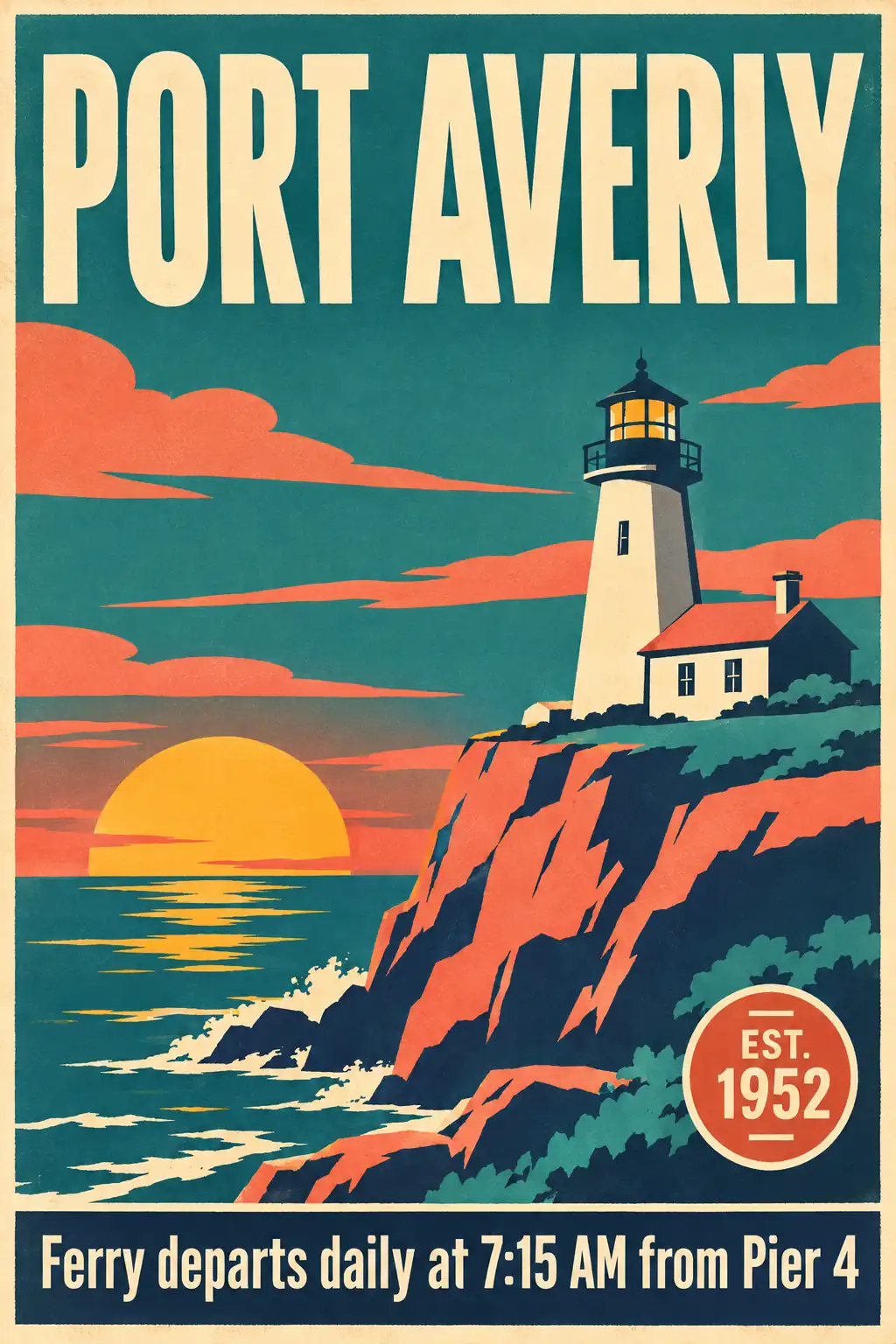
GPT Image 2.6 Sunburst at high quality, 41.5 seconds.
What to expect
If you use Flare, 2.6 was faster at every quality setting we tried, and its time hardly depended on quality. At high quality it took half as long as 2.5 Flare and costs the same per image. At low and medium quality it costs 3.3 to 4.2 times as much as 2.5.
If you use Sunburst, 2.6 was not faster at the default settings. It took longer than 2.5 Sunburst at every quality setting, and added fewer elements that the prompt didn't ask for.
These results cover single text-to-image requests at the default complexity, with three runs per setting. We didn't test lower complexity, editing, or GIF and SVG output. With three runs, small differences, such as Sunburst at high quality where the ranges overlapped, may not hold up over more runs.
Try It Yourself
Both models are available through Puter.js as gpt-image-2.6-flare and gpt-image-2.6-sunburst, along with the 2.5 models and the rest of the GPT Image family. This example times the same prompt on all four.
Script tag
<html>
<body>
    <script src="https://js.puter.com/v2/"></script>
    <script>
        const prompt = "A mid-century modern travel poster of a lighthouse at sunset with the title PORT AVERLY";
        const models = ["gpt-image-2.5-flare", "gpt-image-2.6-flare", "gpt-image-2.5-sunburst", "gpt-image-2.6-sunburst"];

        (async () => {
            for (const model of models) {
                const start = Date.now();
                const image = await puter.ai.txt2img(prompt, { model, quality: "high" });
                puter.print(`${model}: ${((Date.now() - start) / 1000).toFixed(1)}s<br>`);
                image.style.width = "300px";
                document.body.appendChild(image);
            }
        })();
    </script>
</body>
</html>
npm
// npm install @heyputer/puter.js
import { puter } from "@heyputer/puter.js";

const image = await puter.ai.txt2img("A mid-century modern travel poster of a lighthouse at sunset", {
    model: "gpt-image-2.6-flare",
    quality: "high",
    ratio: { w: 1024, h: 1536 }
});

document.body.appendChild(image);
txt2img() defaults to low quality, so set quality when comparing models. Puter.js doesn't pass the complexity, GIF, SVG, or markup options yet, so requests use OpenAI's defaults and return PNG images. Passing input_image turns the request into an edit.
FAQ
What is GPT Image 2.6?
GPT Image 2.6 is OpenAI's image generation and editing model family, released on November 4, 2026. It has two API models, gpt-image-2.6-flare and gpt-image-2.6-sunburst, and appears as Images 2.6 in ChatGPT and Codex. It takes text and image input and returns images.
What is the difference between GPT Image 2.6 Flare and Sunburst?
GPT Image 2.6 Flare is the faster model, and Sunburst is aimed at detailed work and consistency across edits. Both cost the same per image. In our tests, Sunburst took 2.6 to 4.3 times as long as Flare, and both spelled the poster text correctly in every image.
What's new in GPT Image 2.6 compared with GPT Image 2.5?
GPT Image 2.6 adds a complexity setting, markup-guided edits, SVG output, and animated GIF output, and OpenAI says it generates images 50% faster. In our runs, 2.6 Flare was 21% to 50% faster than 2.5 Flare, and 2.6 Sunburst was 11% to 39% slower than 2.5 Sunburst at the default complexity.
How much does GPT Image 2.6 cost per image?
GPT Image 2.6 costs about $0.025 per 1024x1024 image at low quality, $0.043 at medium, and $0.053 at high, according to OpenAI's cost calculator. Token prices are $5 per million text input tokens, $8 per million image input tokens, and $30 per million image output tokens, the same for Flare and Sunburst.
Is GPT Image 2.6 more expensive than GPT Image 2.5?
GPT Image 2.6 costs more than GPT Image 2.5 at low and medium quality, about 4.2 and 3.3 times as much per image, because it produces more output tokens at those settings. At high quality the cost is the same. Token prices did not change.
Can GPT Image 2.6 make GIFs and SVG files?
GPT Image 2.6 can return animated GIFs and SVG files through OpenAI's Image API when output_format is set to gif or svg. SVG output works only on the generations endpoint, while GIFs work on both generations and edits. Images 2.6 also makes GIFs in ChatGPT and Codex. Puter.js doesn't expose these formats yet.
What does the complexity setting do in GPT Image 2.6?
GPT Image 2.6's complexity setting controls how much the model plans a scene before rendering it, with values low, medium, and high. It defaults to high and costs nothing extra. OpenAI recommends low complexity for most quick edits and higher settings for dense text and complex layouts, and notes that higher complexity can add latency.
Can I use GPT Image 2.6 for free?
GPT Image 2.6 is free to integrate with Puter.js, with no API key or backend. Under Puter's User-Pays model, each user covers their own usage, so the developer doesn't pay for it. See our free GPT Image API tutorial for a walkthrough.
When was GPT Image 2.6 released?
GPT Image 2.6 was released on November 4, 2026, in ChatGPT, Codex, and the OpenAI API.
Related
Ship a Full-Stack App with One Prompt
Create a to-do list app using Puter.js
Coding manually? see the guide