The Best Backend Platform for Vibe Coding
On this page
Choosing the backend platform you use is one of the most important decisions when vibe coding, because it shapes what your app can do, how often the AI hallucinates during agentic coding, and how badly things break in production. And it's not as simple as picking the most popular one. There are a handful of criteria that decide whether a platform is actually good for vibe coding or just looks good on a landing page.
The short answer is that there is no single best one. Puter.js is the best fit for client-side apps you want to ship in one shot, Supabase for apps built around relational data, and Firebase for cross-platform mobile apps. The rest of this article covers the criteria behind that answer, how each platform holds up against them, and how to configure your AI tools so they write correct code for whichever one you pick.
The Criteria
All three platforms in this article are managed backends, and that's deliberate. When the AI writes its own backend from scratch (an Express server, hand-rolled auth, a database schema it invented mid-session), that generated infrastructure is exactly the code that turns into technical debt and breaks when real users arrive. A managed platform shrinks what the AI writes down to business logic. The database, scaling, and auth are the platform's code, tested by thousands of other apps, not code that came out of a single prompt session.
With that established, for a framework, SDK, or platform to be good at vibe coding, we find it must follow these:
- Training-data density: how much of the platform the model has seen, which determines hallucination rate.
- Agent tooling: an official MCP server and agent-readable docs, so AI tools can read current documentation and real project state instead of guessing from training data.
- API stability: whether the platform avoids breaking changes that cause the AI to mix old and new idioms.
- Opinionated conventions: one obvious way to do things, so fewer forks for the AI to pick wrong.
- Safe defaults: auth, CSRF, SQL injection, and secrets handled by the platform so vibe-coded apps don't ship vulnerabilities.
- Type safety: a strict compiler that catches the AI's small mistakes before runtime.
- Batteries included: ORM, auth, jobs, email, etc. in one box, so no fragile glue code between fifteen libraries.
- Fast feedback loop: hot reload, instant errors, one-command run and deploy, so the prompt-look-reprompt cycle stays tight.
- Self-contained project: a single repo the model can hold in its head, not a microservices mesh.
- Test ergonomics: trivial to generate and run tests as a safety net for code you didn't read.
- Observability built-in: logging and error reporting by default, so production failures are visible to someone who doesn't fully understand the code.
These all influence how easy it is to vibe code, and how often you'll find yourself going in circles trying to fix something the AI made up.
Puter.js
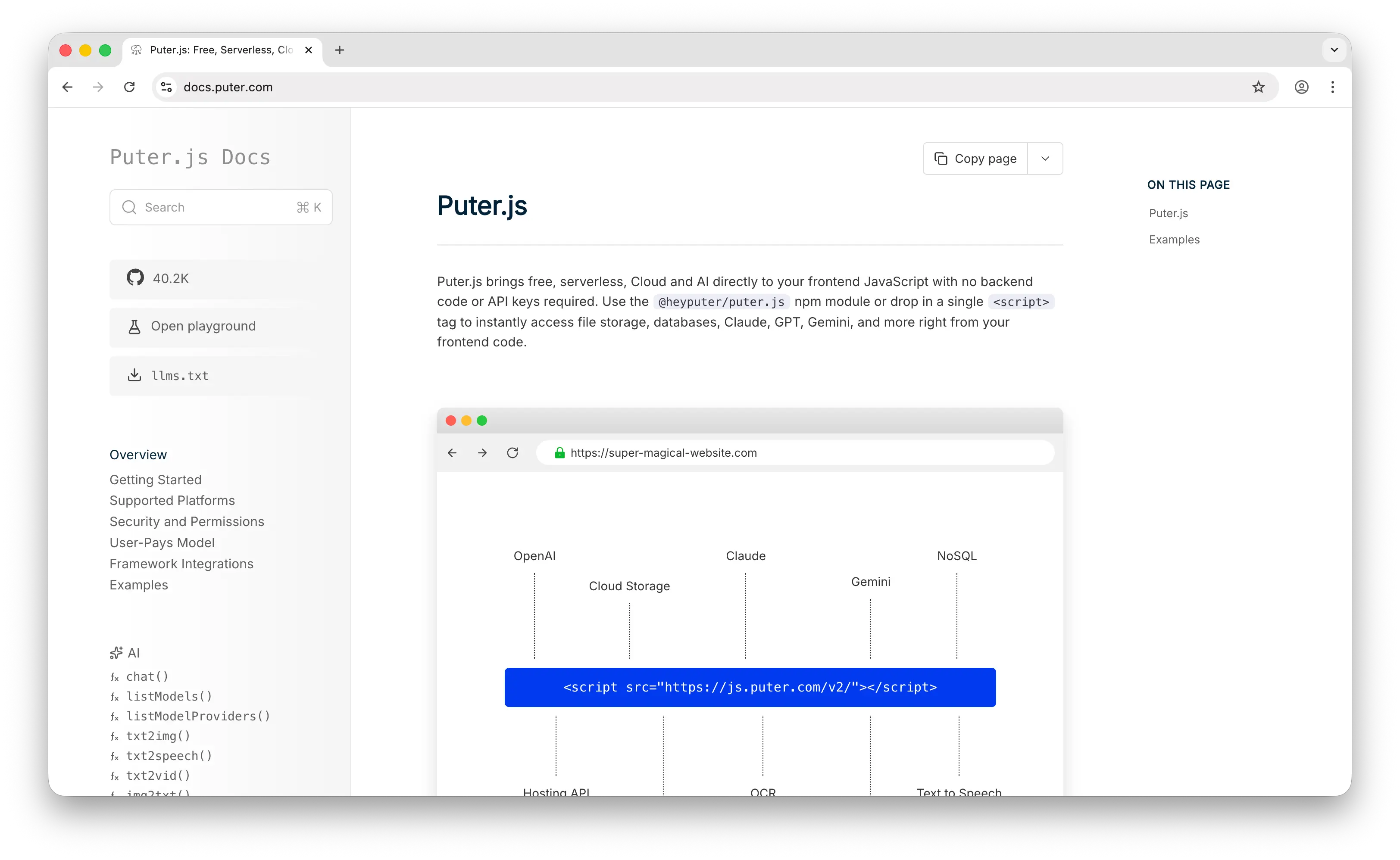
Puter.js is the newest of the three, so the training-data density is still growing. That said, more and more projects on GitHub are using it, and models are getting better at it fast.
Agent tooling closes much of that gap. The Puter MCP server is hosted at mcp.puter.com, so there's nothing to install. In Claude Code it's one command, and the OAuth login happens in the browser:
claude mcp add --transport http --scope user puter https://mcp.puter.com/
The server exposes tools for the filesystem, hosting, serverless workers, and apps, plus documentation tools that let the agent look up current Puter.js docs mid-task instead of writing from memory. We had it connected while writing this article, and the agent could deploy a site and read back the live URL without leaving the editor. The docs are also published as llms.txt and a single-file llms-full.txt you can paste into any context window.
API stability is solid in practice. The CDN pins everyone to v2 via the /v2/ path, and v2 has been stable for years, so old tutorials and old code still work. There was a v1 before, but it's so far in the past that you're unlikely to hit it.
Opinionated conventions are one of Puter.js's quiet strengths. There's a consistent format for AI calls regardless of which model you're hitting:
<script src="https://js.puter.com/v2/"></script>
<script>
  puter.ai.chat("write a haiku about cats", { model: "gpt-5.4-nano" })
    .then(puter.print);
</script>
The same shape works for OpenAI, Claude, Gemini, Grok, DeepSeek, and Kimi. In the regular world each of these providers has a completely different SDK, different auth, and different request shape. Puter.js collapses all of that into one call. Same story for storage (puter.fs.*), key-value (puter.kv.*), and hosting (puter.hosting.*). The small API surface also means fewer architectural decisions for the AI to make in the first place. There's no ORM to pick, no routing paradigm, no state-management library; for most features there's one obvious way to write them.
Safe defaults: you're protected from common attacks like CSRF and SQL injection because you're not managing a server. Each database and storage namespace is isolated per user. Auth is included and handled automatically. When your code tries to access cloud services, Puter prompts the user to sign in. There are also no API keys to leak, because the User-Pays Model means auth is per-user, not per-app.
This setup also bounds the blast radius of AI mistakes. Every call runs as the signed-in user and is sandboxed to that user's namespace, so there's no master database credential or cross-tenant query for generated code to get wrong; a bug in the AI's code is scoped to the data of the user running it. The flip side is that there's no central server-side validation layer unless you add one with a serverless worker.
Type safety: Puter.js ships .d.ts type definitions via its npm package, so you get autocomplete and type checking on the puter.* APIs out of the box when using TypeScript.
Batteries included is where Puter.js really shines. Database, auth, storage, hosting, AI (every major model), and serverless workers, all in a single library. You don't stitch anything together. A "hello world" that uses AI, saves data, and hosts a page looks like this:
<script src="https://js.puter.com/v2/"></script>
<script>
  (async () => {
    // Store a value
    await puter.kv.set("greeting", "hello world");

    // Ask an LLM
    const reply = await puter.ai.chat("say hi");

    // Host a page on a random subdomain
    const dir = puter.randName();
    await puter.fs.mkdir(dir);
    await puter.fs.write(`${dir}/index.html`, `<h1>${reply}</h1>`);
    const site = await puter.hosting.create(puter.randName(), dir);
    puter.print(`live at https://${site.subdomain}.puter.site`);
  })();
</script>
The feedback loop is as tight as it gets. You don't set up infrastructure, you don't manage API keys, you don't deploy a backend. A single HTML file with a script tag is a working app. Refresh and you're testing.
Self-contained: a single repo or even a single HTML file holds your entire application.
Test ergonomics are decent. There's a testMode: true flag on AI calls so you can test code without burning credits, which is nice. Beyond that you use whatever JS test tooling you want (Vitest, Playwright) since everything runs in the browser.
Observability is the weakest area. Since it's client-only, traditional backend APM and server logs don't apply, so you'd bolt on something like Sentry for client-side errors. The docs also don't clearly specify rate limits or usage quotas, which means you can hit unexpected behavior in production. It's the tradeoff for the simplicity everywhere else.
A few extra things worth knowing about Puter.js that don't fit neatly into the criteria but matter for vibe coding:
- The User-Pays Model is a vibe-coding feature. With most platforms you have to wire up billing, set rate limits, and worry about a viral user nuking your free tier. With Puter.js the developer pays $0 regardless of user count, because each user covers their own usage out of their own Puter credits. One less thing for you (and the AI) to get wrong.
- No API keys is bigger than it sounds. Every other backend has the same routine (put keys in
.env, don't commit them, set up proxies so they don't leak to the client, rotate them when one is exposed). With Puter.js there's literally nothing to leak. For vibe coding specifically, this removes one of the most common ways AI-generated code ships vulnerabilities (hardcoded keys in client bundles). - It's open source and self-hostable (AGPL-3.0), which Firebase isn't; Supabase is too. Matters if you care about long-term lock-in.
- The honest limitations come from being client-side. There are no scheduled jobs or traditional background workers; everything happens in response to a user action in the browser, and the serverless workers feature closes some of this gap but not all of it. The KV store is also NoSQL, so like Firestore, you design your data around how you'll read it rather than normalizing it into tables and joining at query time. It works well, but it's a different way of thinking than relational modeling, and it's worth telling the AI which one you're doing. Puter.js is great for apps where the user does something and the app responds; less suited for apps that need work to happen without a user present.
Firebase
Firebase is the oldest player in this space, owned by Google, so the training-data density is massive. Basically every model has seen large amounts of Firebase code, and hallucinations on core stuff like Firestore and auth are rare.
Agent tooling is official and ships with the CLI. The Firebase MCP server runs with npx -y firebase-tools@latest mcp (it graduated from the experimental command it launched under in 2025) and exposes tools for Firestore, Auth, Storage, Cloud Functions, Messaging, and Crashlytics, plus a documentation search tool over Google's developer docs. It authenticates through the Firebase CLI, so the agent works against your actual project, reading real security rules and indexes rather than guessing at them.
API stability is its biggest weakness for vibe coding though. Firebase went through a major v8 to v9 migration where they moved from the namespaced API to a modular tree-shakeable one. The two styles look completely different:
// v8 (old, namespaced)
firebase.firestore().collection("users").doc("123").get();

// v9 (modular, current)
import { doc, getDoc, getFirestore } from "firebase/firestore";
const db = getFirestore();
await getDoc(doc(db, "users", "123"));
AI models frequently mix these in the same file, which breaks things in subtle ways. Firebase does ship a compat layer so old code still works, but you have to keep an eye on which version your code is actually using. If you start fresh and force the AI to stay on the modular API consistently, it works great. Just don't let it drift.
Opinionated conventions are strong. Firestore has one obvious way to structure queries, auth has one obvious flow, and the docs reinforce these patterns.
Safe defaults: Firebase has security rules, a domain-specific language for controlling access to Firestore, Storage, and the Realtime Database. By default everything is locked down. If you don't write rules, your data is inaccessible, which is the safe failure mode.
Type safety: the JS SDK has first-class TypeScript support out of the box, but Firestore documents are loosely typed by default since it's a NoSQL store. You can layer your own types on top, but the database itself won't enforce them. So types help the AI write correct call sites, not correct schemas.
Batteries included is extensive: auth, Firestore, Realtime Database, Cloud Functions, Cloud Storage, hosting, push notifications (FCM), analytics, Remote Config, Crashlytics, A/B testing. All in one console, all one SDK.
Fast feedback loop is excellent. The Firebase Emulator Suite lets you run the entire stack locally, hot reload included. One command to deploy.
Self-contained: yes, one project, one config, one SDK.
Test ergonomics are pretty good. The emulator suite is designed for testing and you can wipe state between runs. Mocking Firestore is well-trodden territory with lots of libraries.
Observability is great on mobile, weaker on web. Crashlytics is the gold standard for iOS and Android crash reporting. For web it's still being built out, and the Firebase team is currently soliciting feedback on what web Crashlytics should look like. Cloud Logging integration exists for the server-side stuff.
Supabase
Supabase is younger than Firebase, but training-data density is already huge because it's marketed everywhere as "the open-source Firebase alternative," and basically every tutorial in the last few years uses it. Models handle it reliably.
Agent tooling is official here too. The Supabase MCP server comes in two forms, a hosted server you connect over OAuth and a local one via npx -y @supabase/mcp-server-supabase@latest. It gives the agent tools to inspect your schema, run queries, manage tables, and fetch config, which pairs well with the generated types covered below, since the AI can check the real database instead of assuming. The docs also ship as llms.txt for pasting into a context window.
API stability has been good since v2 of supabase-js. The PostgREST-based API is the same one it shipped with, the auth client has been stable, and edge functions have evolved in a mostly additive way. No big v8-to-v9 style rewrite.
Opinionated conventions: it pushes you hard toward Postgres, row-level security for authorization, and PostgREST for auto-generated REST endpoints. There's basically one way to do each thing.
Safe defaults: row-level security (RLS) is the headline feature here. You enable RLS on a table and define policies in SQL, and the database itself enforces them on every query. It's the same defense-in-depth model Firebase uses, but at the database layer where it's harder to bypass. SQL injection is also handled by the client library since you're not writing raw queries.
Type safety is Supabase's biggest win over the other two. The Supabase CLI generates TypeScript types directly from your database schema:
npx supabase gen types typescript --project-id "xyz" > database.types.ts
Then your queries are fully typed end-to-end:
import { createClient } from "@supabase/supabase-js";
import { Database } from "./database.types";

const supabase = createClient<Database>(url, key);

// Fully typed: result.data is Movie[], nullable columns are T | null,
// invalid column names are caught at compile time.
const { data, error } = await supabase
  .from("movies")
  .select("id, title, director")
  .eq("year", 2024);
This is a major win for vibe coding because the AI gets full autocomplete, the compiler catches schema mismatches, and you don't end up with the model inventing column names that don't exist.
Batteries included: Postgres database, auth (with social providers, magic links, MFA), storage, edge functions (TypeScript, Deno-based), realtime subscriptions, vector embeddings. All in one dashboard.
Fast feedback loop: the Supabase CLI runs the whole stack locally in Docker, and supabase db push handles migrations. Edge functions hot reload during development.
Self-contained: yes, one project, one client.
Test ergonomics: because it's just Postgres underneath, you can use any Postgres testing tools you want. The CLI supports seeding and resetting the database between tests, and there are mature patterns for testing RLS policies.
Observability is solid and getting better. The dashboard has built-in log views for the API gateway, Postgres, edge functions, and auth, with filtering by status code, user, and path. OpenTelemetry support is rolling out, so you can pipe data into Datadog, Honeycomb, or Sentry.
Keeping the AI Correct: Rules Files and MCP
Whichever platform you pick, the biggest wins come from telling the AI what it can't infer on its own. Coding agents read instructions from a file at the root of your repo. Codex, Cursor, Copilot, and most other tools read AGENTS.md, Claude Code reads CLAUDE.md, and Cursor additionally supports scoped rules in .cursor/rules/. A few lines in that file eliminate whole categories of AI mistakes.
For Firebase, pin the API style so the model never mixes v8 and v9:
- Use the Firebase modular API only (v9+). Never use namespaced
  calls like `firebase.firestore()`.
- We use firebase@12. Check package.json before adding imports.
- Develop against the Firebase Emulator Suite, never production.
For Supabase, make the generated types the source of truth:
- After every migration, run:
  npx supabase gen types typescript --local > database.types.ts
- Never reference a table or column that isn't in database.types.ts.
- Every new table gets RLS enabled and a policy before it ships.
For Puter.js, point the model at current docs and stop it from inventing a backend:
- This app is client-side only, using Puter.js for auth, storage,
  and AI. Do not add a server, a database, or API keys.
- Check https://docs.puter.com/llms.txt for the docs on any
  puter.* API before using it.
- Load Puter.js from https://js.puter.com/v2/ via script tag, or
  import { puter } from "@heyputer/puter.js" via npm.
Then connect the platform's MCP server (all three have one, covered above). The rules file keeps the model from guessing; the MCP server lets it verify against the real project. In our sessions the combination is what keeps a long agentic run from drifting.
One more thing worth being upfront about is that no platform choice replaces a disciplined workflow. Our sessions that go well start with a written plan, build one small vertical slice at a time, and review what shipped before moving on. The ones that go badly are the ones where we prompted for the whole app at once. The platform decides how much of the AI's output is infrastructure you'll have to harden later; the workflow decides everything else. A single-file Puter.js app does help here in one specific way, which is context efficiency. With no Docker configs, env files, or migrations to load, more of the context window goes to the feature you're actually building.
So Which One Should You Actually Use?
All three are good, and they're good at different things. The decision comes down to what your app needs:
A client-side app you want to ship in one shot, especially an AI app: use Puter.js. A single HTML file is a working product with auth, storage, and every major AI model included, there are no API keys to leak, and the User-Pays Model means you pay $0 regardless of how many users show up. Plan around the lack of scheduled jobs, and model your data NoSQL-style around reads rather than as relational tables.
Deep relational data: use Supabase. If your app is joins, reporting, and queries you haven't written yet, you want real Postgres underneath, and the generated TypeScript types let the compiler catch the AI's schema mistakes. It's also the easiest to leave, since it's standard Postgres.
A cross-platform mobile app: use Firebase. Push notifications (FCM), Crashlytics, and analytics work on iOS and Android out of the box, and neither of the other two matches that mobile toolchain. Pin the AI to the modular API with a rules file and it stays reliable.
The criteria at the top of this article are the lens. Apply them to whatever you're picking next, even something not on this list, and you'll usually end up with a backend that works with you instead of one that fights you every step of the way.
Related
Ship a Full-Stack App with One Prompt
Create a to-do list app using Puter.js
Coding manually? see the guide