How to Use Anthropic SDK with Puter
On this page
Puter provides a native Anthropic-compatible endpoint. This means you can drop in the official Anthropic TypeScript SDK, point it at Puter, and start calling Claude immediately.
Prerequisites
- A Puter account
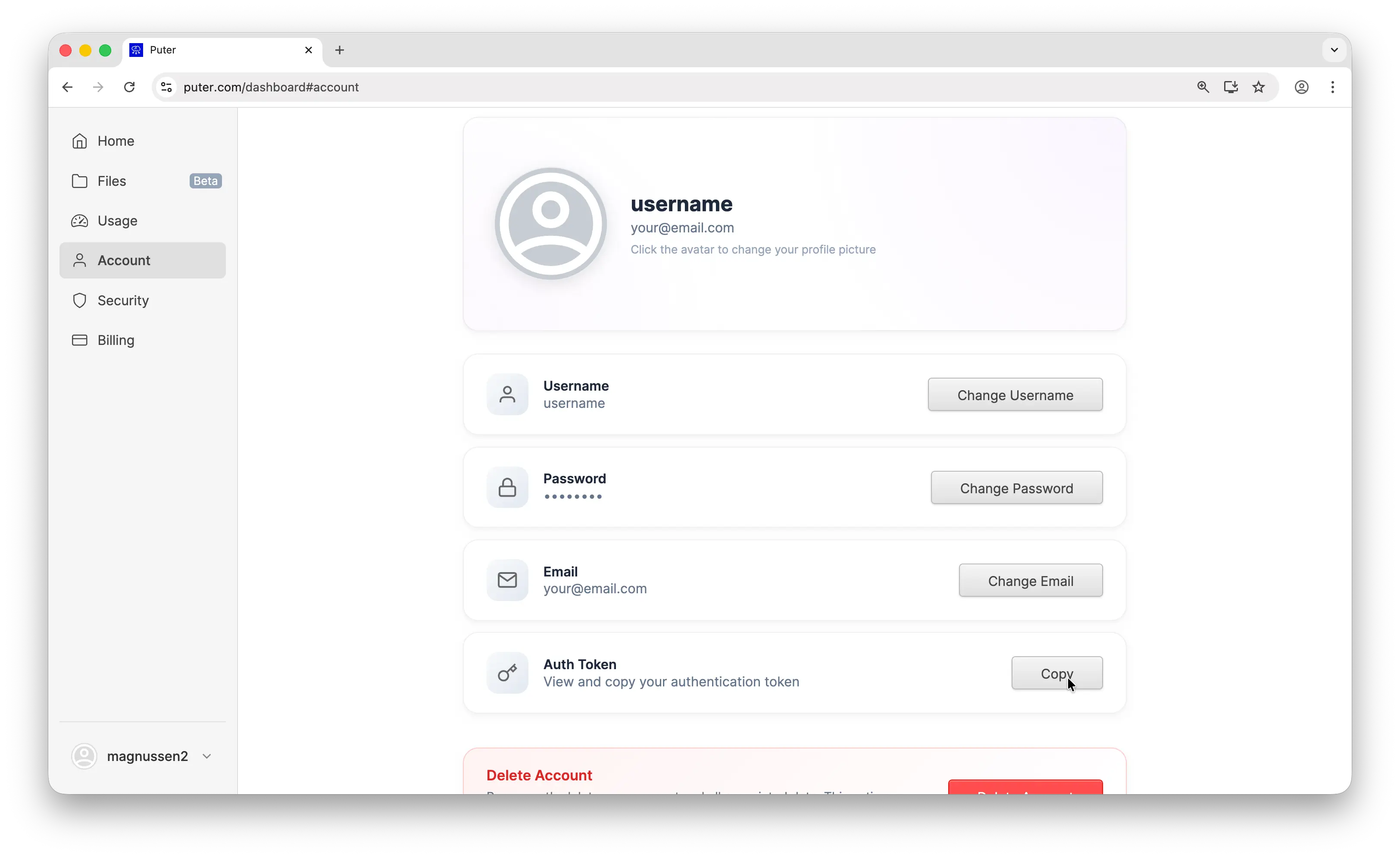
- Your Puter auth token, go to puter.com/dashboard and click Copy to get your auth token
- Node.js installed on your machine
Setup
Install the Anthropic SDK:
npm install @anthropic-ai/sdk
Next, initialize the client by pointing it at Puter's base URL with your auth token:
import Anthropic from "@anthropic-ai/sdk";

const client = new Anthropic({
  baseURL: "https://api.puter.com/puterai/anthropic",
  apiKey: "YOUR_PUTER_AUTH_TOKEN",
});
Swap YOUR_PUTER_AUTH_TOKEN for the token you copied earlier. You're ready to go.
Example 1: Basic Message
Here's the most basic usage, sending a single message and reading the reply:
import Anthropic from "@anthropic-ai/sdk";

const client = new Anthropic({
  baseURL: "https://api.puter.com/puterai/anthropic",
  apiKey: "YOUR_PUTER_AUTH_TOKEN",
});

const message = await client.messages.create({
  model: "claude-sonnet-4-6",
  max_tokens: 1024,
  messages: [
    { role: "user", content: "What is the capital of France?" },
  ],
});

console.log(message.content[0].text);
This calls Claude Sonnet and prints the reply. Everything works exactly like the official Anthropic API. The only thing that changes is the base URL and token.
Example 2: Streaming
When you want to display output as it's being generated, enable streaming:
import Anthropic from "@anthropic-ai/sdk";

const client = new Anthropic({
  baseURL: "https://api.puter.com/puterai/anthropic",
  apiKey: "YOUR_PUTER_AUTH_TOKEN",
});

const stream = await client.messages.create({
  model: "claude-sonnet-4-6",
  max_tokens: 1024,
  messages: [
    { role: "user", content: "Write a short story about a robot learning to paint." },
  ],
  stream: true,
});

for await (const event of stream) {
  if (event.type === "content_block_delta" && event.delta.type === "text_delta") {
    process.stdout.write(event.delta.text);
  }
}
Pass stream: true and loop through the incoming events. Look for content_block_delta events, since each one carries a fragment of text you can render right away.
Example 3: Multi-turn Conversation
Build on prior context by passing the full message history in the messages array:
import Anthropic from "@anthropic-ai/sdk";

const client = new Anthropic({
  baseURL: "https://api.puter.com/puterai/anthropic",
  apiKey: "YOUR_PUTER_AUTH_TOKEN",
});

const message = await client.messages.create({
  model: "claude-sonnet-4-6",
  max_tokens: 1024,
  messages: [
    { role: "user", content: "What is the capital of France?" },
    { role: "assistant", content: "The capital of France is Paris." },
    { role: "user", content: "What is its population?" },
  ],
});

console.log(message.content[0].text);
Because the earlier exchange is included, Claude knows "its" refers to Paris and answers with the relevant population data.
Example 4: Tool Use
Tools allow Claude to call functions you define. Below is a get_weather example that shows the full round-trip:
import Anthropic from "@anthropic-ai/sdk";

const client = new Anthropic({
  baseURL: "https://api.puter.com/puterai/anthropic",
  apiKey: "YOUR_PUTER_AUTH_TOKEN",
});

// Define the tool
const tools = [
  {
    name: "get_weather",
    description: "Get the current weather for a given location",
    input_schema: {
      type: "object",
      properties: {
import Anthropic from "@anthropic-ai/sdk";
const client = new Anthropic({
baseURL: "https://api.puter.com/puterai/anthropic",
apiKey: "YOUR_PUTER_AUTH_TOKEN",
});
// Define the tool
const tools = [
{
name: "get_weather",
description: "Get the current weather for a given location",
input_schema: {
type: "object",
properties: {import Anthropic from "@anthropic-ai/sdk";
const client = new Anthropic({
baseURL: "https://api.puter.com/puterai/anthropic",
apiKey: "YOUR_PUTER_AUTH_TOKEN",
});
// Define the tool
const tools = [
{
name: "get_weather",
description: "Get the current weather for a given location",
input_schema: {
type: "object",
properties: {
location: {
type: "string",
description: "City name, e.g. San Francisco",
},
},
required: ["location"],
},
},
];
// Send the request with tools
const response = await client.messages.create({
model: "claude-sonnet-4-6",
max_tokens: 1024,
messages: [
{ role: "user", content: "What's the weather like in Tokyo?" },
],
tools: tools,
});
// Handle the tool call
const toolUse = response.content.find((block) => block.type === "tool_use");
if (toolUse) {
console.log(`Model wants to call: ${toolUse.name}`);
console.log(`With arguments:`, toolUse.input);
// Simulate a tool response
const toolResult = JSON.stringify({ temperature: "22°C", condition: "Partly cloudy" });
// Send the tool result back to the model
const finalResponse = await client.messages.create({
model: "claude-sonnet-4-6",
max_tokens: 1024,
messages: [
{ role: "user", content: "What's the weather like in Tokyo?" },
{ role: "assistant", content: response.content },
{
role: "user",
content: [
{
type: "tool_result",
tool_use_id: toolUse.id,
content: toolResult,
},
],
},
],
tools: tools,
});
console.log(finalResponse.content[0].text);
}
Claude inspects the question, determines it needs weather data, and emits a tool_use block. You run the function, feed the result back as a tool_result, and Claude produces a final human-readable answer.
Example 5: cURL
You can also hit the endpoint directly with cURL or any HTTP client:
curl https://api.puter.com/puterai/anthropic/v1/messages \
  -H "Content-Type: application/json" \
  -H "x-api-key: YOUR_PUTER_AUTH_TOKEN" \
  -H "anthropic-version: 2023-06-01" \
  -d '{
    "model": "claude-sonnet-4-6",
    "max_tokens": 1024,
    "messages": [
      {"role": "user", "content": "Hello, how are you?"}
    ]
  }'
Since the endpoint is fully Anthropic-compatible, any HTTP client or library that targets the Anthropic API will work. Just update the URL and pass your Puter token as the API key.
Conclusion
You're all set. With a single Puter account you can talk to Claude through the native Anthropic SDK, no separate Anthropic API key or billing required.
For more, explore the Puter.js documentation, see all supported AI models, or dive into the Puter.js AI API for vision, text-to-speech, image generation, and more.
Related
Free, Serverless AI and Cloud
Start creating powerful web applications with Puter.js in seconds!
Get Started Now