How to Add an AI Chatbot to Your Website
On this page
In this tutorial you will add an AI chatbot to your website using Puter.js. The chatbot reads the content of your page and answers visitor questions based on that content, so visitors can ask things like "what does this product do?" or "how do I contact you?" and get answers grounded in what is actually on the page.
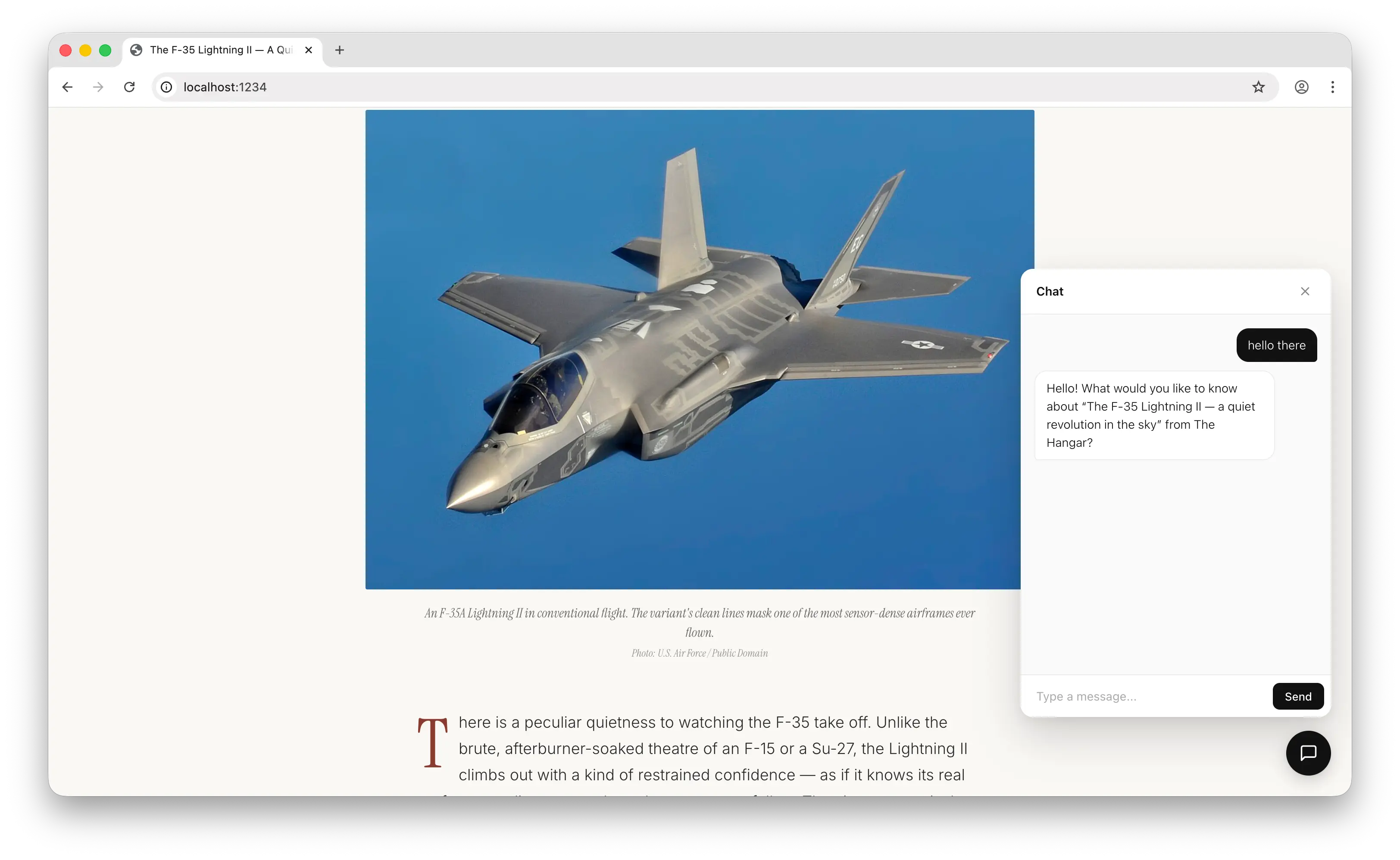
How It Works
The chat button sits at the bottom right of your page. When a visitor clicks it, a chat panel opens and they sign in with their Puter account. When they ask a question, the script reads the text on your page, sends it to Puter AI as context, and streams the answer back into the panel.
You do not pay for AI usage. Visitors cover their own usage with their Puter account (User-Pays Model), and new accounts get free credits, so most visitors can use the chatbot without paying anything either.
Step 1: Add the Puter.js Script
Open the HTML of your website and add this line inside the <head> or near the end of <body>:
<script src="https://js.puter.com/v2/"></script>
That is all you need to start using Puter.js. There is no signup, no API key, no install step.
Step 2: Add the Chatbot Script
Save the following code to a file called chatbot.js next to your HTML file, then add this script tag below the Puter.js tag:
<script src="chatbot.js"></script>
Here is the full chatbot.js file. Copy it as is:
function init() {
  // Styles
  const style = document.createElement("style");
  style.textContent = `
    #puter-chat-toggle {
      position: fixed; right: 24px; bottom: 24px;
      width: 52px; height: 52px; border-radius: 50%;
      background: #111; color: #fff; border: none;
      cursor: pointer; z-index: 2147483000;
      display: flex; align-items: center; justify-content: center;
      box-shadow: 0 6px 20px rgba(0,0,0,0.18), 0 1px 3px rgba(0,0,0,0.08);
      transition: transform 0.18s ease, box-shadow 0.18s ease;
    }
    #puter-chat-toggle:hover { transform: translateY(-1px); box-shadow: 0 10px 28px rgba(0,0,0,0.22), 0 1px 3px rgba(0,0,0,0.08); }
    #puter-chat-toggle svg { width: 22px; height: 22px; display: block; }
function init() {
// Styles
const style = document.createElement("style");
style.textContent = `
#puter-chat-toggle {
position: fixed; right: 24px; bottom: 24px;
width: 52px; height: 52px; border-radius: 50%;
background: #111; color: #fff; border: none;
cursor: pointer; z-index: 2147483000;
display: flex; align-items: center; justify-content: center;
box-shadow: 0 6px 20px rgba(0,0,0,0.18), 0 1px 3px rgba(0,0,0,0.08);
transition: transform 0.18s ease, box-shadow 0.18s ease;
}
#puter-chat-toggle:hover { transform: translateY(-1px); box-shadow: 0 10px 28px rgba(0,0,0,0.22), 0 1px 3px rgba(0,0,0,0.08); }
#puter-chat-toggle svg { width: 22px; height: 22px; display: block; }function init() {
// Styles
const style = document.createElement("style");
style.textContent = `
#puter-chat-toggle {
position: fixed; right: 24px; bottom: 24px;
width: 52px; height: 52px; border-radius: 50%;
background: #111; color: #fff; border: none;
cursor: pointer; z-index: 2147483000;
display: flex; align-items: center; justify-content: center;
box-shadow: 0 6px 20px rgba(0,0,0,0.18), 0 1px 3px rgba(0,0,0,0.08);
transition: transform 0.18s ease, box-shadow 0.18s ease;
}
#puter-chat-toggle:hover { transform: translateY(-1px); box-shadow: 0 10px 28px rgba(0,0,0,0.22), 0 1px 3px rgba(0,0,0,0.08); }
#puter-chat-toggle svg { width: 22px; height: 22px; display: block; }
#puter-chat-panel {
position: fixed; right: 24px; bottom: 92px;
width: 360px; height: 520px; max-height: calc(100vh - 120px);
background: #fff; color: #111;
border-radius: 14px;
box-shadow: 0 20px 50px rgba(0,0,0,0.18), 0 4px 12px rgba(0,0,0,0.06);
display: none; flex-direction: column; overflow: hidden;
font-family: -apple-system, BlinkMacSystemFont, "Segoe UI", Roboto, Helvetica, Arial, sans-serif;
font-size: 14px; line-height: 1.5;
z-index: 2147483000;
}
#puter-chat-panel.open { display: flex; }
#puter-chat-header {
padding: 14px 18px;
border-bottom: 1px solid #ececec;
font-weight: 600; font-size: 14px;
display: flex; align-items: center; justify-content: space-between;
}
#puter-chat-close {
background: transparent; border: none; cursor: pointer;
color: #888; padding: 4px; line-height: 0;
border-radius: 4px;
}
#puter-chat-close:hover { color: #111; background: #f3f3f3; }
#puter-chat-close svg { width: 16px; height: 16px; display: block; }
#puter-chat-messages {
flex: 1; padding: 16px; overflow-y: auto;
display: flex; flex-direction: column; gap: 10px;
background: #fafafa;
}
.puter-chat-msg {
padding: 9px 13px; border-radius: 14px;
max-width: 85%; white-space: pre-wrap; word-wrap: break-word;
}
.puter-chat-msg.user {
background: #111; color: #fff;
align-self: flex-end;
border-bottom-right-radius: 4px;
}
.puter-chat-msg.bot {
background: #fff; color: #111;
align-self: flex-start;
border: 1px solid #ececec;
border-bottom-left-radius: 4px;
}
#puter-chat-form {
display: flex; align-items: center;
border-top: 1px solid #ececec;
background: #fff;
padding: 8px;
}
#puter-chat-input {
flex: 1; border: none; outline: none; background: transparent;
padding: 8px 10px; font-size: 14px;
font-family: inherit; color: #111;
}
#puter-chat-input::placeholder { color: #aaa; }
#puter-chat-send {
border: none; background: #111; color: #fff;
padding: 8px 14px; cursor: pointer;
border-radius: 8px; font-size: 13px; font-weight: 500;
font-family: inherit;
transition: opacity 0.15s ease;
}
#puter-chat-send:hover { opacity: 0.85; }
#puter-chat-send:disabled { opacity: 0.4; cursor: not-allowed; }
.puter-chat-typing {
display: inline-flex; gap: 4px; align-items: center;
padding: 2px 0;
}
.puter-chat-typing span {
width: 6px; height: 6px; border-radius: 50%;
background: #999; display: inline-block;
animation: puter-chat-bounce 1.2s ease-in-out infinite;
}
.puter-chat-typing span:nth-child(2) { animation-delay: 0.15s; }
.puter-chat-typing span:nth-child(3) { animation-delay: 0.3s; }
@keyframes puter-chat-bounce {
0%, 60%, 100% { transform: translateY(0); opacity: 0.4; }
30% { transform: translateY(-4px); opacity: 1; }
}
#puter-chat-messages::-webkit-scrollbar { width: 6px; }
#puter-chat-messages::-webkit-scrollbar-thumb { background: #d8d8d8; border-radius: 3px; }
#puter-chat-messages::-webkit-scrollbar-thumb:hover { background: #bbb; }
@media (max-width: 480px) {
#puter-chat-panel {
right: 12px; left: 12px; bottom: 84px;
width: auto; height: calc(100vh - 110px);
}
}
`;
document.head.appendChild(style);
// UI
const toggle = document.createElement("button");
toggle.id = "puter-chat-toggle";
toggle.setAttribute("aria-label", "Open chat");
toggle.innerHTML = `<svg viewBox="0 0 24 24" fill="none" stroke="currentColor" stroke-width="2" stroke-linecap="round" stroke-linejoin="round"><path d="M21 15a2 2 0 0 1-2 2H7l-4 4V5a2 2 0 0 1 2-2h14a2 2 0 0 1 2 2z"/></svg>`;
document.body.appendChild(toggle);
const panel = document.createElement("div");
panel.id = "puter-chat-panel";
panel.innerHTML = `
<div id="puter-chat-header">
<span>Chat</span>
<button id="puter-chat-close" type="button" aria-label="Close chat">
<svg viewBox="0 0 24 24" fill="none" stroke="currentColor" stroke-width="2" stroke-linecap="round" stroke-linejoin="round"><line x1="18" y1="6" x2="6" y2="18"/><line x1="6" y1="6" x2="18" y2="18"/></svg>
</button>
</div>
<div id="puter-chat-messages"></div>
<form id="puter-chat-form">
<input id="puter-chat-input" type="text" placeholder="Type a message..." autocomplete="off" />
<button id="puter-chat-send" type="submit">Send</button>
</form>
`;
document.body.appendChild(panel);
const messagesEl = panel.querySelector("#puter-chat-messages");
const form = panel.querySelector("#puter-chat-form");
const input = panel.querySelector("#puter-chat-input");
const closeBtn = panel.querySelector("#puter-chat-close");
toggle.addEventListener("click", () => {
panel.classList.toggle("open");
if (panel.classList.contains("open")) input.focus();
});
closeBtn.addEventListener("click", () => {
panel.classList.remove("open");
});
// Page content as context
const pageContent = document.body.innerText.slice(0, 8000);
const conversation = [
{
role: "system",
content:
"You are a friendly, helpful assistant for this website. You are in service mode: respond only to what the visitor actually asks, and answer concisely. Do not volunteer summaries, overviews, or unprompted explanations of the page. Do not dump information the user did not ask for.\n\nWhen a visitor opens the chat or sends a vague greeting, simply greet them back and ask what they would like to know — do not preemptively describe the page. Answer follow-up questions narrowly and stop. If they want more, they will ask.\n\nUse only the page content below as your source of truth. If something is not on the page, say so briefly and offer to help with something else.\n\nRespond in plain text only. Do not use markdown formatting of any kind: no asterisks for bold or italic, no backticks, no hash headings, no hyphen or numbered lists, no links in [text](url) form. Use natural sentences and line breaks only.\n\nPAGE CONTENT:\n" +
pageContent,
},
];
function addMessage(role, text) {
const el = document.createElement("div");
el.className = "puter-chat-msg " + role;
el.textContent = text;
messagesEl.appendChild(el);
messagesEl.scrollTop = messagesEl.scrollHeight;
return el;
}
// Send a message
form.addEventListener("submit", async (e) => {
e.preventDefault();
const question = input.value.trim();
if (!question) return;
input.value = "";
addMessage("user", question);
conversation.push({ role: "user", content: question });
const botEl = addMessage("bot", "");
botEl.innerHTML = `<span class="puter-chat-typing"><span></span><span></span><span></span></span>`;
messagesEl.scrollTop = messagesEl.scrollHeight;
try {
const response = await puter.ai.chat(conversation, false, {
model: "gpt-5.4-nano",
stream: true,
});
let answer = "";
for await (const part of response) {
if (part?.text) {
answer += part.text;
botEl.textContent = answer;
messagesEl.scrollTop = messagesEl.scrollHeight;
}
}
conversation.push({ role: "assistant", content: answer });
} catch (error) {
botEl.textContent = "Sorry, something went wrong: " + error.message;
}
});
}
if (document.readyState === "loading") {
document.addEventListener("DOMContentLoaded", init);
} else {
init();
}
That is the whole chatbot in about 200 lines of plain JavaScript. No build step, no framework, no extra dependencies.
If you would rather paste the script directly into your HTML instead of using a separate file, wrap the code in a <script> tag and put it below the Puter.js tag. The separate file is cleaner if your site has a lot of pages or your chatbot grows over time.
Step 3: Test It
Open your page in a browser. You should see a chat button at the bottom right corner of the screen.
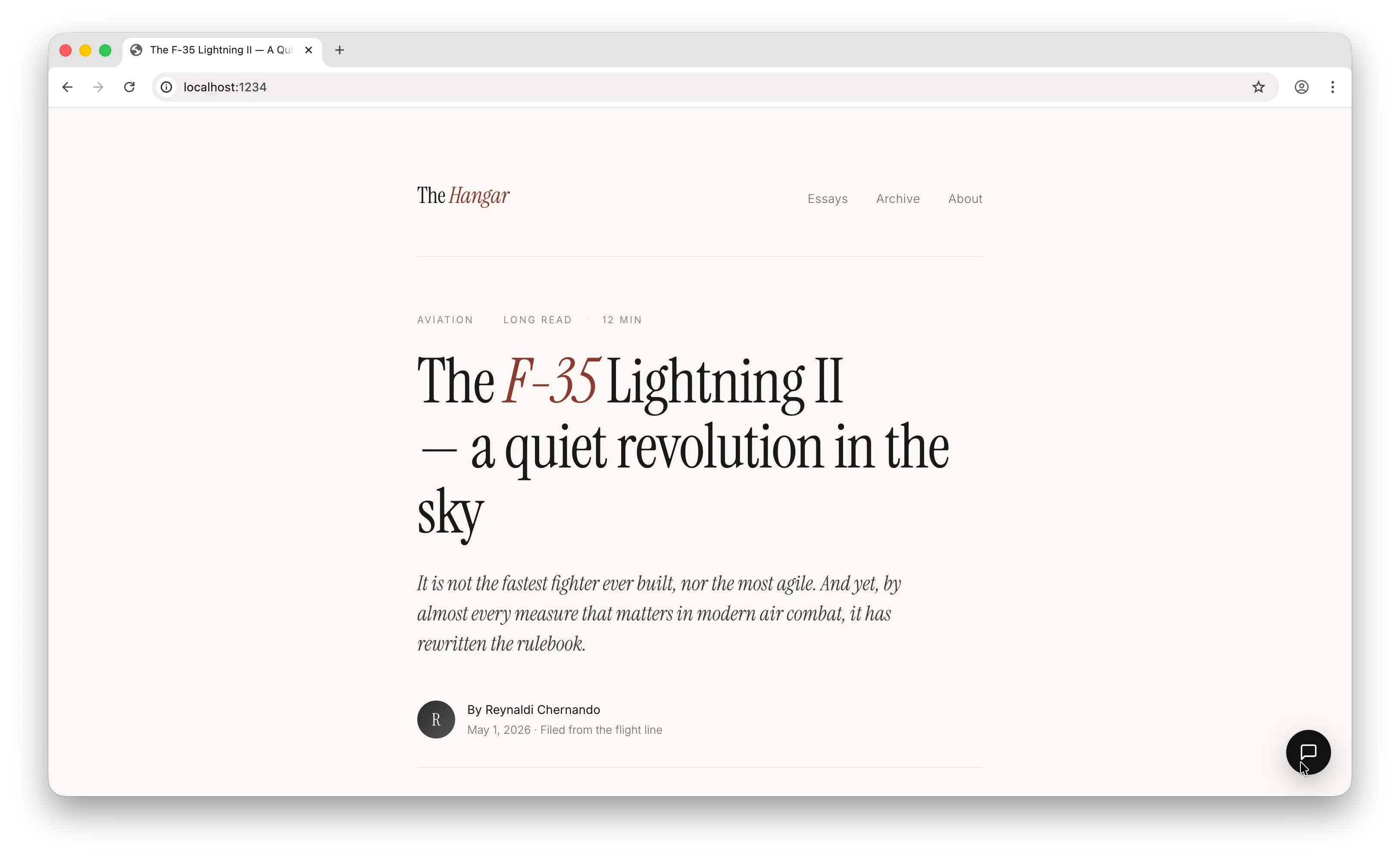
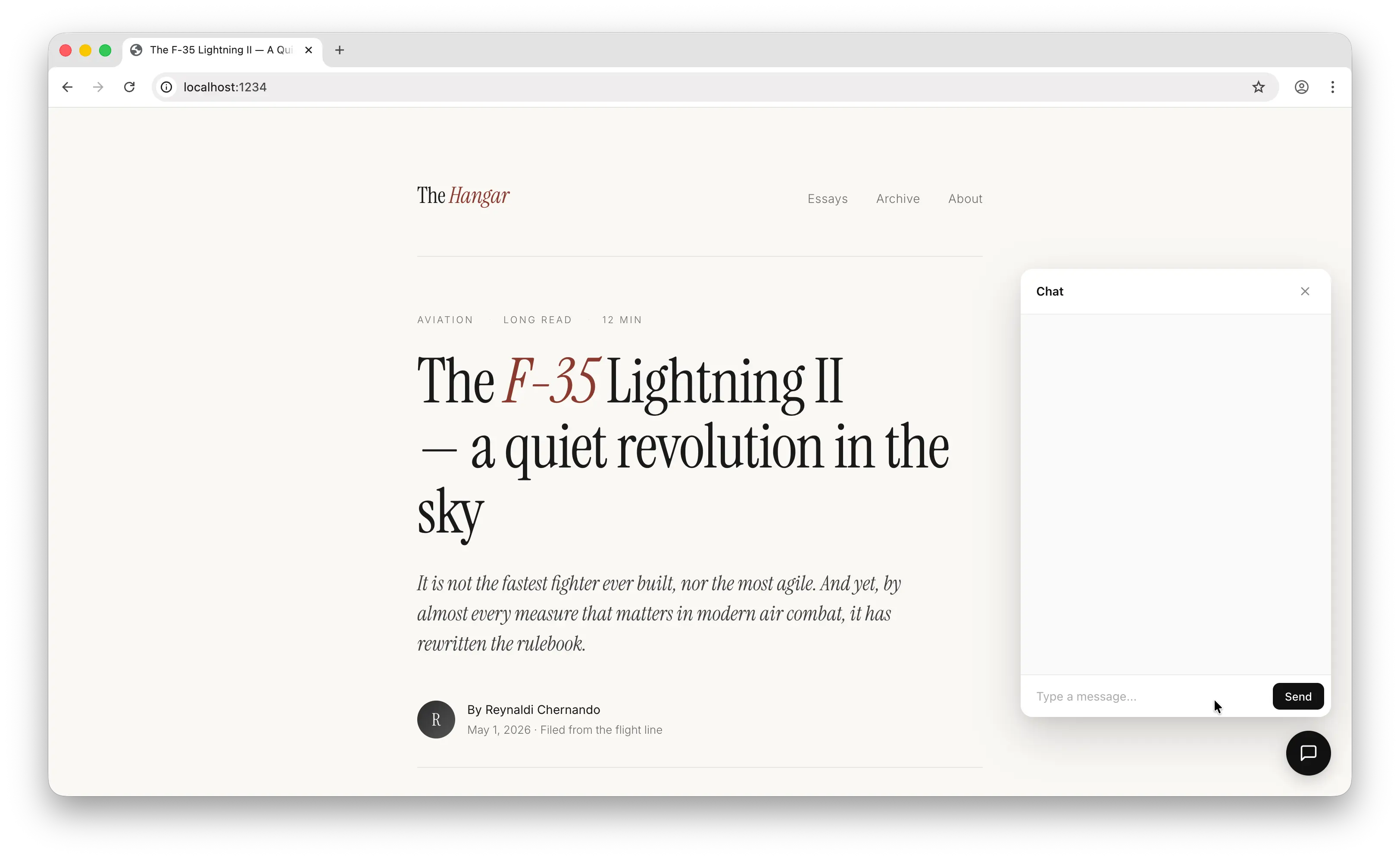
Click it to open the chat panel, type a question about your page, and press Send. The first time a visitor sends a message, Puter shows a sign-in popup. After they sign in, the answer streams into the panel word by word.
A Few Notes
The chatbot uses the visible text on your page as context. The script grabs the first 8000 characters of document.body.innerText and passes it to the AI as a system prompt. If your page is longer or you want more context, change the 8000 number in the script.
The example uses the gpt-5.4-nano model because it is fast and cheap. You can swap it for any of the 400+ models supported by Puter.
The conversation array keeps the full chat history, so the AI can answer follow-up questions in context.
Conclusion
You added an AI chatbot to your website by including the Puter.js script and a small chatbot script. The chatbot reads your page content, answers questions about it, and streams the response. There is no backend, no API key, and no usage cost for you.
Get started with Puter.js and explore more features like cloud storage, key-value stores, and 500+ AI models.
Related
Ship a Full-Stack App with One Prompt
Build an AI chat app using Puter.js
Coding manually? see the guide