Building a File Sharing App with Puter.js
On this page
In this tutorial, we'll build a file sharing app that lets you upload any file and instantly get a shareable public URL using Puter.js.
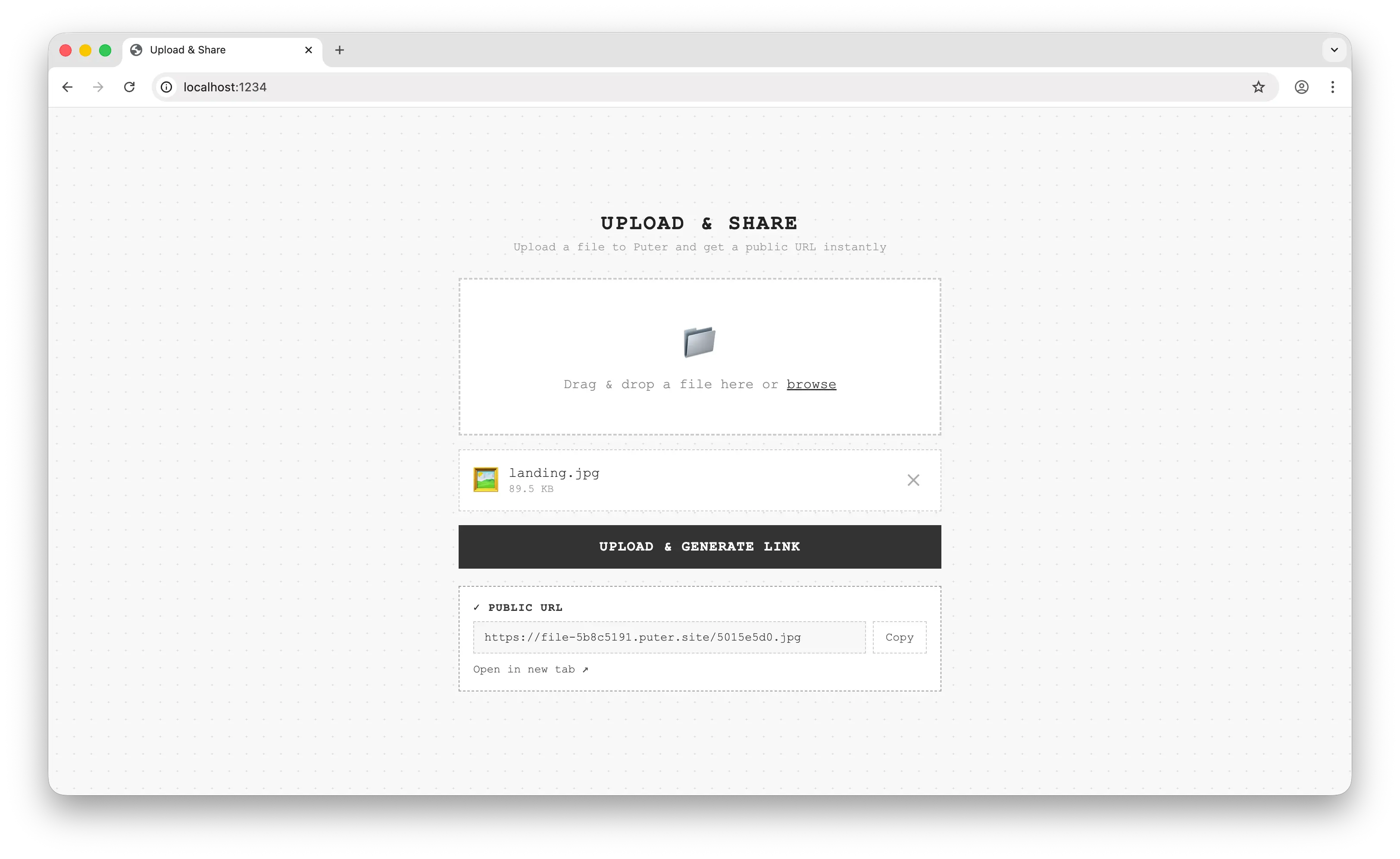
Demo: https://file-sharing-example.puter.site/
Key Features
Our file sharing app provides a simple drag-and-drop interface for sharing files:
- Drag & drop upload: Select files by dragging them onto the page or clicking to browse
- Cloud storage: Files are stored in Puter's cloud file system
- Public URLs: Each uploaded file gets a public URL via Puter Hosting
- Persistent subdomain: The app remembers your subdomain across sessions using Puter KV
Getting Started
This app is a single index.html file with no build step. Add Puter.js via CDN:
<script src="https://js.puter.com/v2/"></script>
Puter.js is a JavaScript library that provides features like AI, cloud file storage, database, hosting, and authentication, all running client-side with a User-Pays Model.
Building the App
The app includes a drag-and-drop UI, file previews, and progress indicators. This tutorial focuses on the Puter.js APIs that power it. You can find the full source code here.
When the user selects a file and clicks upload, three things happen using Puter.js:
- Create a hosted subdomain to serve files publicly
- Upload the file to Puter's cloud file system
- Generate a public link from the subdomain and file name
Creating a Hosted Subdomain
Before uploading, we need a place to serve the files. Puter Hosting lets you create a subdomain under *.puter.site that maps to your cloud file system. We create one on first use and save it with puter.kv so it persists across sessions:
// Check if we already have a subdomain from a previous session
let subdomain = await puter.kv.get("site_subdomain");

if (!subdomain) {
  // First time: generate a unique subdomain and create the site
  subdomain = "file-" + crypto.randomUUID().split("-")[0];
  await puter.hosting.create(subdomain, ".");
  await puter.kv.set("site_subdomain", subdomain);
}
puter.hosting.create(subdomain, directory) links the subdomain to a directory in Puter's file system. Here we point it at "." (the app root), so any file we write to will be accessible at https://<subdomain>.puter.site/<filename>.
puter.kv acts as a simple key-value database. By saving the subdomain here, subsequent visits skip the creation step and reuse the same subdomain.
Uploading the File
With the subdomain ready, we write the file to Puter's cloud file system. To avoid name collisions, we prefix the file name with a short UUID:
// Generate a unique file name to avoid collisions
const extension = selectedFile.name.includes(".")
  ? "." + selectedFile.name.split(".").pop()
  : "";
const uniqueName = crypto.randomUUID().split("-")[0] + extension;

// Write the file to Puter's cloud file system
await puter.fs.write(uniqueName, selectedFile);
puter.fs.write(path, content) writes any File, Blob, or string to the user's cloud storage. Since our hosted site points at the root directory, this file is now publicly accessible.
Generating the Public Link
The public URL is simply the subdomain plus the file name:
const publicUrl = `https://${subdomain}.puter.site/${encodeURIComponent(uniqueName)}`;
We use encodeURIComponent on the file name to handle any special characters in the extension or UUID. The user can now copy this URL and share it with anyone.
Conclusion
You've now built a file sharing app with Puter.js by combining:
- Puter File System: Storing uploaded files in the cloud with
puter.fs.write - Puter Hosting: Creating a public
*.puter.sitesubdomain to serve files withputer.hosting.create - Puter Key-Value Store: Persisting the subdomain across sessions with
puter.kv
The best part? With Puter's User-Pays Model, you can deploy this app for free. Users authenticate with their own Puter account, so they cover their own usage, making your app free to run and scale.
Demo: https://file-sharing-example.puter.site/
Source Code: https://github.com/Puter-Apps/file-sharing
Get started with Puter.js and access features like AI, cloud storage, key-value stores, hosting, and more.
Free, Serverless AI and Cloud
Start creating powerful web applications with Puter.js in seconds!
Get Started Now